Explore more like this
Overview
Refurbished (Good) - Samsung Galaxy Book5 Pro 16" Touchscreen Copilot+ PC Laptop (Intel Core Ultra 7 258V/1TB SSD/16GB RAM)
Available online only
Delivery times vary by location. Most Marketplace items leave sellers' locations within 2 business days. Allow additional time for shipping.
What you need to know:
- Membership is $19.99 / month until you cancel.
- You can cancel at any time, but if you cancel after the first 30 days you may be subject to a service recovery fee.
What you need to know:
- Membership is $19.99 / month until you cancel.
- You can cancel at any time, but if you cancel after the first 30 days you may be subject to a service recovery fee.
Seller Return Policy
Warranty
Check with the manufacturer for details.
For Quebec residents: See the Availability Guarantee disclosure in the Specifications section below.
What's included:
- Power Adaptor
- Data Cable
- Quick Start Guide
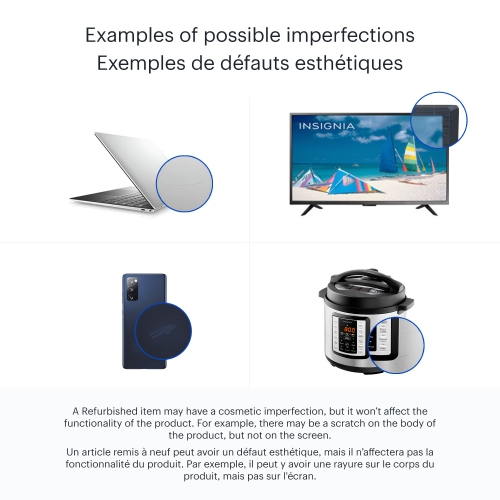
This Refurbished product:
· Has been inspected to ensure 100% functionality.
· Has very light signs of wear, like scratches and/or scuff marks · in non-visible areas.
· Possible uneven light diffusion or subtle scuffs on screen, not visible when screen is on.
· Includes all required accessories.
· Includes a minimum 90-day warranty.
· Comes in generic packaging.
· May be eligible for return. See the Return Policy tab for details.
• Powered by AI and the super-fast Intel Core Ultra 7 258V processor, it features powerful graphics and an advanced NPU capable of up to 47 TOPS
• From detailed presentations to enjoying vibrant content, it all looks captivating on the 3K Dynamic AMOLED 2x display with touchscreen
• Details will stand out even in bright sunlight with anti-reflective technology thanks to Corning Gorilla Glass with DX and Vision Booster that automatically detects light to adjust the screen [1]
• Sync your smartphone via Phone Link to access calls, texts, images, mobile apps right from your PC. Plus, use AI features from your Galaxy phone to unlock more productivity on a big screen of Galaxy Book5 Pro [2]
• When you need to power up, plug in the compact charger to get up to 35% charge in just 30mins
• Features 120Hz adaptive refresh rate that makes experiences super smooth and lag-free
• AI Select lets you search right on your PC screen (requires internet connection and Samsung Account login. Results may vary by uniqueness, clarity and framing of circled image and related factors. Accuracy of results not guaranteed). No need to type — simply trace an image, a text message or even a QR code on the screen using cursor or finger and get search results on the fly
• Retouch images and clean up blurry photos in Samsung Gallery with Photo Remaster (Samsung Account login and Internet connection required). This helpful tool uses a smart algorithm that gives all-new life to your pics and makes every detail shine — just like magic
• Use Cocreator in Paint to sketch your idea and watch as AI transforms it into artwork (edit, regenerate and apply finishing touches using simple prompts. Requires internet connection. Optimized for English text prompts)
• Make conference calls easy with Live Captions (Requires internet connection. Currently supports translation for video and audio subtitles into English from 40+ languages). AI automatically detects speech in meetings and video streams and converts it into English captions in real time so you can easily follow along
• The power you need to realize your ambitions in a sleek, lightweight body
• Easily navigate using the touchpad with adaptive palm rejection. Control your taps with precision thanks to palm monitoring on the subdivided palm area. Plus, connect devices to your workstation using the two built-in Thunderbolt 4 ports, HDMI, USB-A, microSD card slot and headphone/mic
• Double your workspace by connecting Galaxy Tab as an additional display to your PC (1 Compatible only with Tab S Series. Both devices must Wi-Fi network activated). Link the devices with just a click on your laptop, then take advantage of the extra space on Galaxy Tab with Extension, Duplicate and Rotation modes to rearrange your view
• Sharing image, videos, documents and large files between your Galaxy Book and other Galaxy devices is a breeze with
• Quick Share (Quick Share between Galaxy devices available with the following OS: smartphones and tablets with
• Android OS version 10.0 (Q) and One UI 2.1 or above, PCs running Windows 10 or later. Requires Wi-Fi and
• Bluetooth connection). Plus, the private sharing feature encrypts your data with blockchain technology
• Enjoy pro security with Samsung Knox
• Go online, stay online. Wi-Fi 7 lets you connect reliably with lightning speed (requires optimal connection and a Wi-Fi 7 router. Results may vary). Join online meetings, share updates and stay in touch easily with smooth real-time interactions and ultra-low latency
[1] Corning’s glass composite enhances display readability through a 75% improvement in front surface reflection, versus standard cover glass, and increases the display contrast ratio by 50% with the same display brightness.
[2] Requires Galaxy S22 Series, Flip4 or Fold4 and later with One UI 6.1 and above. Must be logged in to the same Windows and Samsung account on both devices and have a Bluetooth and WiFi connection. Some mobile apps may have security features that prevent the mobile app from being viewed on PC
What you need to know:
- Membership is $19.99 / month until you cancel.
- You can cancel at any time, but if you cancel after the first 30 days you may be subject to a service recovery fee.