ROG Xbox Ally Family


Complete your setup today

Compare tech specs
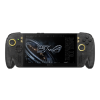 ROG Xbox Ally X20 | 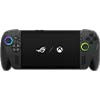 ROG Xbox Ally X | 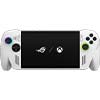 ROG Xbox Ally | |
| Windows 11 Home operating system | ✔ | ✔ | ✔ |
| Ergonomics and input | |||
| Xbox inspired ergonomics featuring impulse trigger ABXY buttons | ✔ | ✔ | ✔ |
| D-pad | ✔ Transforming | ✔ | ✔ |
| Triggers | L & R Hall Effect analog triggers L & R impulse triggers | L and R impulse | L and R Hall Effect analog |
| L and R bumpers | ✔ | ✔ | ✔ |
| Xbox button | ✔ | ✔ | ✔ |
| View button | ✔ | ✔ | ✔ |
| Menu button | ✔ | ✔ | ✔ |
| Command center button | ✔ | ✔ | ✔ |
| Library button | ✔ | ✔ | |
| 2 assignable back buttons | ✔ | ✔ | |
| 2 assignable grip buttons | ✔ | ||
| 2 full-size analog sticks | ✔ | ✔ | |
| HD haptics | ✔ | ✔ | ✔ |
| 6-axis IMU | ✔ | ✔ | ✔ |
| Processor | AMD Ryzen™ AI Z2 Extreme Processor | AMD Ryzen AI Z2 Extreme Processor | AMD Ryzen Z2 A |
| Memory | 24GB LPDDR5X-8000 | 24GB LPDDR5X-8000 | 16GB 6400 LPDDR5X |
| Storage | |||
| M.2 2280 SSD Storage for easier upgrade | 1TB SSD | 1TB | 512GB |
| Display | 7.4" FHD (1080P) IPS OLED, 600 nits (SDR)/1400 nits (HDR) 16:9 | 7" FHD (1080P) IPS, 500 nits, 16:9 | 7" FHD (1080P) IPS, 500 nits, 16:9 |
| 120Hz high refresh rate | ✔ | ✔ | ✔ |
| Storage FreeSync premium | ✔ | ✔ | ✔ |
| Gorilla Vitus and Corning DXC anti reflection | ✔ | ✔ | ✔ |
| I/O ports | 1x Type C support USB 4 (Thunderbolt™ 4 compliance, DisplayPort™ 2.1 with Freesync support, Power Delivery 3.0) 1x USB 3.2 Gen 2 Type-C support DisplayPort™ / power delivery 1x UHS-I microSD Express SD7.1 card reader | 1x USB4 Type-C with Display Port 2.1 / Power Delivery 3.0 Thunderbolt 4 compatible 1x USB 3.2 Gen 2 Type-C with Display Port 2.1/Power Delivery 3.0 1 x UHS-II microSD card reader (supports SD, SDXC and SDHC; UHS-1 with DDR200 mode) | 2x USB 3.2 Gen 2 Type-C with Display Port 2.1 / Power Delivery 3.0 1x UHS-II microSD card reader (supports SD, SDXC and SDHC) 1 x 3.5 mm combo audio jack |
| Wi-Fi 6E (2 x 2) and Bluetooth 5.4 WLAN | ✔ | ✔ | ✔ |
| Dimensions | 300 x 121 x 27.5 ~ 51.3 mm | 290.8 x 121.5 x 50.7mm | 290.8 x 121.5 x 50.7mm |
| Weight | 715g | 670g | |
| Battery | 80Wh | 80Wh | 60Wh |
| Included | ROG Xbox Ally X 68W charger stand | ROG Xbox Ally X 65W charger stand | ROG Xbox Ally 65W charger stand |
4 results
ROG Xbox Ally, Ally X and Ally X20: Portable Power Meets Full PC Freedom
What Is the ROG Xbox Ally Family?
The ROG Xbox Ally family includes the ROG Xbox Ally and ROG Xbox Ally X, with the limited-edition ROG Xbox Ally X20 joining the lineup. Developed by ASUS ROG in collaboration with Xbox, these handheld gaming PCs combine familiar Xbox-inspired controls with the versatility of Windows 11.
The Xbox full screen experience is optimized for handheld navigation and brings supported games from Xbox, Game Pass, Battle.net and other leading PC storefronts together in one library. You can install games directly on the device, access cloud gaming services or use Remote Play to connect to a compatible Xbox console.
The ROG Xbox Ally X20 expands the family with a limited-edition design, an OLED display and upgraded controls. It also features distinctive 20th-anniversary styling, including a translucent black chassis, accented internal details and illuminated joysticks.
How Powerful Are These Handheld Gaming PCs?
The ROG Xbox Ally is powered by an AMD Ryzen Z2 A processor and includes 16GB of memory and 512GB of solid-state storage. It is designed as an accessible option for everyday handheld gaming, game streaming and cloud-based play.
The ROG Xbox Ally X steps up to an AMD Ryzen Z2 Extreme processor, 24GB of high-speed memory and 1TB of solid-state storage. Its 80Wh battery also provides greater capacity than the 60Wh battery found in the standard Ally, making it better suited to demanding games and longer portable sessions.
The ROG Xbox Ally X20 features an AMD Ryzen AI Z2 Extreme processor, 24GB of LPDDR5X memory, 1TB of storage and an 80Wh battery, combining high-end handheld performance with upgraded display and control features.
Its 7-inch Full HD ROG Nebula HDR OLED touchscreen provides deeper contrast and more vivid colours than the IPS displays used by the ROG Xbox Ally and Ally X. A 120Hz refresh rate, FreeSync Premium Pro support and up to 1,400 nits of peak brightness help deliver smooth motion and detailed HDR visuals.
What Makes the ROG Xbox Ally Family Different?
Because these handhelds run Windows 11, they are not limited to a single game store or subscription service. You can access supported games from Xbox and other PC storefronts, install compatible Windows applications and personalize your settings according to how you play.
The Xbox full screen experience provides a more console-like interface designed for controller navigation. Its aggregated library gives you quick access to supported games installed through Xbox, Game Pass, Battle.net and other PC stores.
Game Bar also provides access to your library, apps, chats and settings, while integration with ASUS Armoury Crate lets you manage device and control options. You can still use Windows applications, communication platforms and compatible game mods when you want a more traditional PC experience.
What Does the ROG Xbox Ally X20 Add?
The ROG Xbox Ally X20 adds several hardware and design upgrades to the ROG Xbox Ally family. Its 7-inch OLED display is paired with TMR joysticks designed to reduce drift and provide accurate inputs.
An adaptable D-pad lets you switch between four-way and eight-way directional control, making it easier to tailor inputs to different games and genres. Its ergonomic grips draw on the familiar feel of Xbox Wireless Controllers for comfortable handheld play.
The X20's anniversary design includes a translucent black exterior that reveals parts of the internal structure, accented fans, illuminated joysticks and an exclusive 20th-anniversary badge on the rear. These details give the handheld a distinctive collector-inspired appearance while retaining the flexibility of a Windows gaming PC.
Are the ROG Xbox Ally Models Comfortable to Use?
The ROG Xbox Ally and Ally X have contoured grips based on the design principles of Xbox Wireless Controllers. Their asymmetrical thumbsticks, familiar ABXY layout, triggers, bumpers and assignable rear buttons are positioned to provide a controller-like feel in a portable design.
The standard Ally uses Hall Effect analog triggers, while the Ally X adds impulse triggers for enhanced feedback. The X20 further updates the control experience with TMR joysticks and an adaptable D-pad that can switch between four-way and eight-way configurations.
Actual comfort will depend on factors such as hand size and session length, but each model is designed to make handheld navigation and gaming feel familiar to Xbox controller users.
Can You Expand Storage or Connect Accessories?
The ROG Xbox Ally family includes built-in solid-state storage along with microSD card support, giving you additional options for managing a growing game library. The ROG Xbox Ally X20 includes 1TB of built-in storage and a microSD Express card reader for compatible removable storage.
USB-C connectivity with DisplayPort support allows you to connect compatible monitors, docks and other accessories. Depending on the model, you can also connect controllers, keyboards, mice, headsets and charging hubs to create a tabletop or desktop-style setup.
Wi-Fi 6E and Bluetooth 5.4 support make it possible to connect compatible wireless accessories, access cloud saves and use online gaming features without relying entirely on cables.
Which ROG Xbox Ally Model Should You Choose?
Choose the ROG Xbox Ally for an accessible handheld gaming PC suited to everyday play, game streaming and cloud gaming. Its AMD Ryzen Z2 A processor, 16GB of memory and 512GB SSD provide a balance between portability, performance and value.
Choose the ROG Xbox Ally X for greater processing power, more memory, twice the storage and a larger battery. It is designed for players who want stronger performance and higher visual settings from demanding PC games.
Choose the ROG Xbox Ally X20 for a premium handheld experience with an AMD Ryzen AI Z2 Extreme processor, 24GB of memory, 1TB of storage, a 7-inch OLED display, upgraded controls and exclusive 20th-anniversary styling.
Whether you are playing downloaded games while travelling, streaming from the couch or connecting to a larger screen, the ROG Xbox Ally family combines handheld portability with the flexibility of a Windows gaming PC.
Frequently Asked Questions about the ROG Xbox Ally X20
What comes with the ROG Xbox Ally X20?
The ROG Xbox Ally X20 comes with the gaming handheld, a power adapter, warranty card and manual.
Can I add removable storage to the ROG Xbox Ally X20?
Yes. The ROG Xbox Ally X20 includes a microSD Express card reader, allowing you to add compatible removable storage alongside its built-in 1TB storage.
Do I need Xbox Game Pass to use a ROG Xbox Ally?
No. An Xbox Game Pass membership is only required to access the Game Pass catalogue. You can also install and play supported games purchased through Xbox and other compatible PC storefronts.