Logitech MX Master 4
Logitech

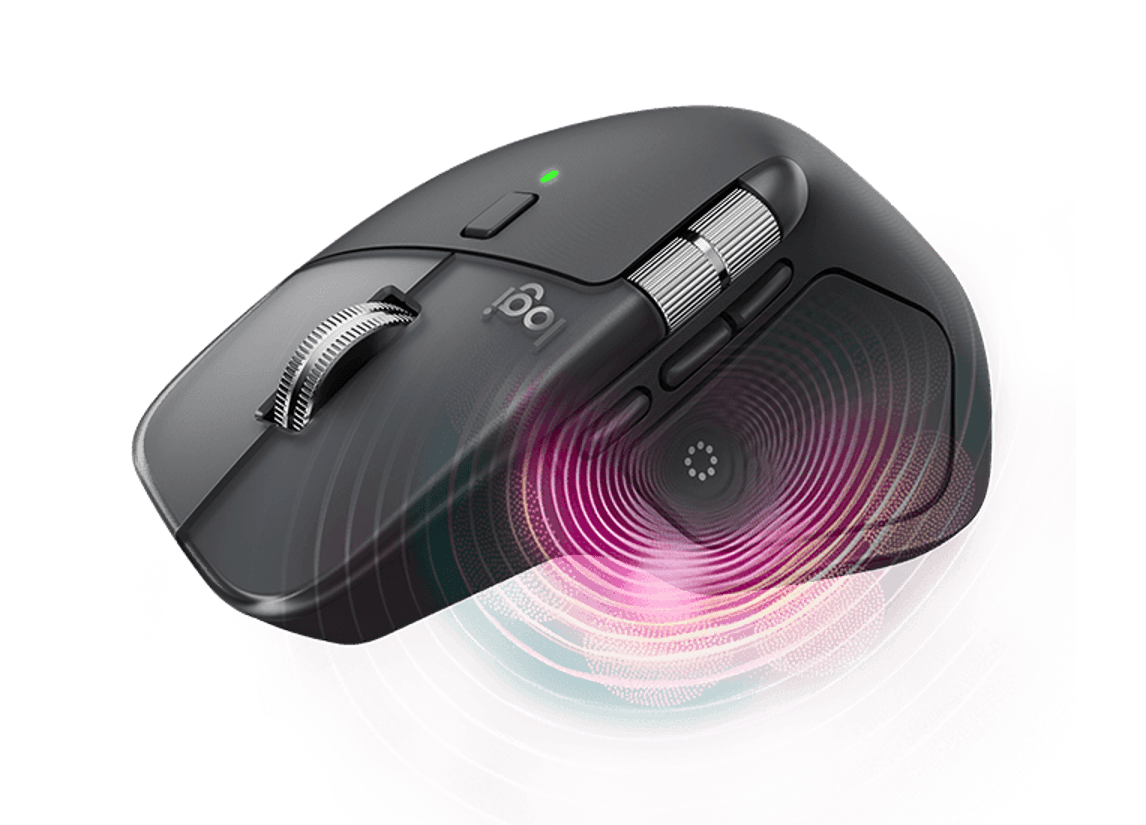
Introducing Logitech MX Master 4.
With customizable haptics for next-level control.

Meet the MX Master 4 - Logitech’s Most Advanced Mouse Yet
What is the Logitech MX Master 4?
The Logitech MX Master 4 is a premium wireless mouse designed for professionals who demand speed, precision, and comfort in their daily workflows. As the latest evolution in the MX series, it introduces haptic feedback for the first time giving users tactile responses that enhance control and efficiency across creative, business, and multitasking environments. Whether you're working on detailed design projects, managing data, or navigating multiple screens, the MX Master 4 is built to keep up with your most demanding tasks.
What’s new compared to previous MX models?
The MX Master 4 brings a new level of responsiveness and control to the series. It is the first MX mouse to offer customizable haptic feedback, allowing you to feel subtle vibrations when completing actions or using shortcuts. It also features a new digital tool called the Actions Ring, accessible through the Logi Options+ app, which streamlines your workflow by surfacing app-specific shortcuts directly on screen. Connectivity is also more powerful than ever thanks to a high-performance chip and optimized antenna placement, making wireless performance faster and more reliable whether you're connected via Bluetooth or the included USB-C dongle.
What is the Actions Ring and how does it help?
The Actions Ring is a software overlay that allows you to assign shortcuts and automate functions depending on the app you're using. Whether you're editing images in Photoshop, crunching data in Excel, or switching between devices, this feature is designed to reduce repetitive movements and speed up common tasks. According to Logitech, using the MX Master 4 with the Actions Ring can help save up to 33% of your time and reduce mouse movements by over 60%.
Who should use the MX Master 4?
This mouse is ideal for users who spend long hours at their desks and rely on high-performance tools to stay productive. Creative professionals such as designers and editors will appreciate the tactile precision and app-specific control. Business users and developers will benefit from its ergonomic design, multi-device support, and the ability to track smoothly on virtually any surface. There is also a version tailored for enterprise environments, the MX Master 4 for Business, which supports remote monitoring and deployment through Logitech Sync.
Is the MX Master 4 comfortable for extended use?
Yes, the MX Master 4 is ergonomically designed with a sculpted shape that promotes a natural hand position. Its intuitive button layout and thumb scroll wheel offer easy access to key functions, while the soft, quiet clicks help reduce distractions in shared or open workspaces. It’s built for long sessions and fast-paced workflows without compromising on comfort.
Can it track on different surfaces?
Thanks to its high-precision 8,000 DPI sensor, the MX Master 4 delivers smooth, accurate tracking on virtually any surface including glass. This makes it ideal for modern desk setups, whether you’re using a mouse pad, a wooden table, or a glass workspace.
How long does the battery last and how is it charged?
The battery life is designed to support extended use, offering up to 70 days on a full charge. If you're low on power, just one minute of quick charging via USB-C gives you up to three hours of use. This ensures you stay productive without worrying about frequent interruptions or downtime.
Can I use it with multiple devices?
Absolutely. The MX Master 4 can connect to up to three devices at once, and you can switch between them seamlessly using either the Easy-Switch button or the Actions Ring interface. It’s compatible across operating systems including Windows, macOS, ChromeOS, Linux, iPadOS, and Android. If you're using Logitech Flow via Logi Options+, you can even move your cursor or transfer files between screens and devices.
What are the available colours and styles?
The MX Master 4 comes in several finishes to match your workspace. Standard colours include Graphite, Black, and Pale Grey, while Mac users can opt for dedicated versions in Space Black or White Silver that are styled to match Apple devices. The business version is available in Graphite and is optimized for IT deployment.
Is the MX Master 4 environmentally friendly?
Logitech has integrated several sustainability measures into the MX Master 4. The mouse includes recycled plastics, up to 54% depending on the model, and uses a battery made with 100% recycled cobalt. The thumbwheel is made from low-carbon aluminum, and the packaging is responsibly sourced and easy to recycle. This makes it a more environmentally conscious choice for professionals who care about reducing their footprint.