Skip to main contentSkip to footer
1 of 2

Overview

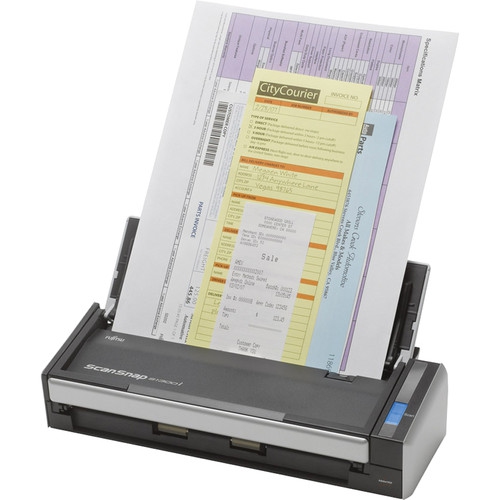
The ScanSnap S1300i Document Scanner from Fujitsu scans at a fast 12 ppm in both single-sided and duplex scanning modes. Digitize all sorts of documents with ScanSnap. With your papers, business cards, magazine clippings neatly organized as digital data, eliminate desk and filing cabinet clutter and keep organized.

Fujitsu Document Scanner Scansnap S1300i (PA03643-B005)

Model: S1300I
Web Code: 11425706
Sold and shipped by | 3.5 seller rating (632 reviews)

Sale ends: *

Available for deliveryAvailable online only

Delivery times vary by location. Most Marketplace items leave sellers' locations within 2 business days. Allow additional time for shipping.

Seller Return Policy

Warranty

Check with the manufacturer for details.

For Quebec residents: See the Availability Guarantee disclosure in the Specifications section below.

What's included:

  • AC Cable
  • AC Adapter
  • USB Bus Power Cable
  • USB Cable (2.0m)
  • Getting Started
  • Safety Precautions
  • Set-up DVD-ROM

Main Features:

• Compact Size

• Scan Speed: 12 ppm

• Scan Resolution: 600 dpi

• Automatic Duplex Scanning

• USB-Powered for Increased Portability

• Scan Directly to the Cloud

• Scan to Commonly Used Programs

At nearly half the size of a sheet of paper, the ScanSnap S1300i is the smallest multi-page double-sided ScanSnap scanner for one-button ease of use at the desk or on the road. Stack up to 10 pages into the automatic document feeder (ADF) and press the blue button

Capture full detail thanks to the scanner's dual 600 dpi scan elements

ScanSnap S1300i scans both sides of each page at up to 12 pages per minute directly to PDF, searchable PDF, JPEG, or to office applications like Word or Excel. The ScanSnap S1300i automatically recognizes the size of each document, detects and corrects for skew, and shows images in their proper orientation. You can even choose to have blank pages automatically removed

ScanSnap S1300i comes with an AC adapter but for added mobile convenience, the ScanSnap S1300i can be powered though the computer's USB ports when an AC power source is not available. Please note that when using the USB bus power cable, the computer must have two USB ports; one for power feeding and the other for USB cable connection

Ready to be Used on a Windows or Mac Computer

The Quick Menu allows you to quickly transition between different scanning options. Just press the scan button and choose a destination:

• Scan To Folder: Store scans to a folder, network folder, or to SharePoint (Windows) or iDisk (Mac)

• Scan To Email: Eliminate faxing and share electronic documents over email

• Scan Business Cards: Scan business cards and automatically extract contact information

• Scan To Print: Use ScanSnap with your printer to create copies

• Scan To Word: Scan directly to an editable Word file

• Scan To Excel: Scan directly to an editable Excel file

• Scan To Mobile Devices: Link to an iPad or iPhone and select Android smartphones and tablets

• Scan To The Cloud: Scan to Evernote, Google Docs, Salesforce CRM, Salesforce Chatter,

• SugarSync, SharePoint Online (for Windows), and Dropbox

Connectivity
USB
Scanning Method
CIS
Minimum System Requirements
Windows XP/Vista/7/8/8.1/10

Dimensions

Width (Inches)
11.8 in
Height (Inches)
3.03 in
Depth (Inches)
3.9 in
Weight
1.4 kg

For Quebec residents – Disclosure under the Consumer Protection Act

In compliance with Bill 29, Best Buy and third-party sellers on Best Buy Marketplace do not guarantee the availability of replacement parts, repair services, or maintenance information for any products. Coverage provided through any Best Buy Protection programs and applicable manufacturer warranties, if any, remain in place. Please contact the manufacturer directly for information about their availability guarantee.

Shipping Charges

Free standard shipping may be available on orders over a minimum amount (before taxes, fees, and promo codes). Shipping charges may vary based on item size and your shipping address. Want a shipping charge estimate? Simply add an item to your cart, then access the cart and enter your postal code in the shipping estimate section.

Processing Time

Most items ship within 2 business days after an order is placed*. Allow additional time for shipping to your address.
*Please note: If an item you ordered becomes unavailable, you'll be notified and a full refund will be processed within 2 business days.

Shipping Area Restrictions

Shipping is not available in the following areas*:
  • No restrictions in Canada
*Please note: Shipping area restrictions may vary for large items. If an item can't be shipped to your address, we'll let you know during the checkout process.
Product Category
Printers
Return/Exchange Period
30 days
Condition
Opened