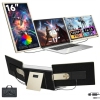
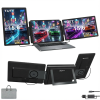
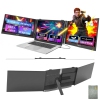
The TUTT S7 Pro Portable Monitor for Laptop is engineered for professionals and creators who require a precise, adaptable multi-screen setup. Featuring dual 16-inch Full HD (1920×1200) IPS displays with a 16:10 aspect ratio, it provides approximately 11% more vertical screen space compared to traditional 16:9 monitors. This added height improves visibility when working with documents, spreadsheets, or coding environments while maintaining the clarity of 1200p resolution.
Attention: For using the H5 cable, driver installation is required. If you are on a Government or Corporate laptop, please ensure you have IT permission to install the driver.
Technical Support:
For direct setup assistance, scan the QR code label included on your package. Enter your order number and provide a phone number. A technician will contact you within 90 minutes to guide you through installation or troubleshooting
Triple Laptop Screen Extender
The S7 expands a standard laptop into a three-screen workstation. Each panel rotates up to 235° horizontally and 90° vertically, allowing side-by-side, stacked, mirrored, or portrait configurations. Screens can also be detached and used independently, supporting a wide range of workflows.
Flexible Stand Design
A lightweight all-aluminum frame supports ergonomic adjustments including height, swivel, tilt, and pivot. Each panel weighs only 689g with a slim 9mm profile, making the system portable without compromising durability. The complete setup weighs 5.7 lbs and can be transported with the included carrying bag.
Reverse Charging Power
Equipped with 65W+ bidirectional power delivery, the S7 Pro can be connected to an external outlet to supply power both to the monitor system and the laptop simultaneously. This eliminates the limitation of insufficient charging ports during extended use.
Multiple Connection Options
The monitor supports USB-C and HDMI inputs, and comes with a H5 conversion cable for broader device compatibility. It works with MacBooks (including M1–M3 series), Windows laptops, Linux systems, and gaming consoles such as Switch and PS4. For laptops without Thunderbolt USB-C, the included H5 cable and drivers enable full functionality.
Seven Viewing Modes
Mirror, extend, portrait, and landscape modes are all supported, giving users flexibility to adapt their screen layout to different applications — from video editing to presentation work.
Integrated Audio
Built-in stereo speakers with a 60Hz refresh rate provide a balanced audiovisual experience without requiring additional accessories.
⸻
Specifications
•Display Size: Dual 16” FHD IPS (1920×1200, 16:10)
•Rotation: 235° horizontal, 90° vertical
•Connectivity: USB-C, HDMI, H5 adapter cable
•Audio: Integrated stereo speakers
•Weight: 5.7 lbs total | 689g per screen
•Profile: 9mm thickness per screen
•Power Delivery: PD 65W+ reverse charging
•Adjustments: Height, tilt, swivel, pivot
⸻
Package Contents
•1 × TUTT S7 Pro Monitor Host (with 2 screens)
•2 × USB-A to USB-C Cables
•2 × USB-C to USB-C Cables
•1 × HDMI to USB-C Cable
•1 × H5 2-in-1 High-Definition Video Cable
•1 × Sleeve Stand + 1 × Single Screen Stand
•1 × Carrying Bag
•2 × User Manuals
⸻
✅ Best use case: A precise Laptop Screen Extender for remote work, content creation, and gaming. The combination of 16:10 aspect ratio, reverse charging, and multiple screen configurations ensures professional efficiency in any environment.
How to Connect Dual Screen Portable Monitor to a Laptop
Compatible Models: TUTT S7 Pro | S3 | S6 | F3 | S2 Mini – Dual Screen Portable Monitors
Connection instructions vary depending on your laptop’s available ports. Please review the options below:
1. HDMI + Full-Featured USB-C (Thunderbolt)
Recommended Setup for Best Performance
* First Screen
* Connect a full-featured USB-C cable directly from your laptop to the USB-C port on the first screen.
* No external power is required.
* Second Screen
* Connect HDMI from your laptop to the HDMI/DP (typically red-marked) port on the second screen.
* Use a USB-C cable to supply power to the second screen.
Note: While the second screen may receive power from the laptop, external power is strongly recommended for stable performance.
2. HDMI + Regular USB-C or USB-A
When Your Laptop Does Not Support Thunderbolt USB-C
* First Screen
* Connect HDMI from your laptop to the HDMI/DP (typically red-marked) port on the screen.
* Power the screen using a USB-C cable connected to an external power source (recommended).
* Powering from laptop is possible but not advised for long sessions.
* Second Screen
* Connect the included H5 conversion cable (USB-C + USB-A heads) to your laptop.
* Connect the USB-C end of the H5 cable to the HDMI/DP (red) port on the second screen.
* Use an external USB-C cable to power the second screen.
* A blue screen with connection icons should appear.
* Locate and install the “Display” driver on your laptop.
* If no display appears, restart your system after driver installation.
3. MacBooks with One Full-Featured USB-C + One Regular USB-C
For Mac M1, M2, M3 Series and Newer Models
* First Screen
* Connect a full-featured USB-C cable directly to the first screen.
* No external power required.
* Second Screen
* Connect the included H5 conversion cable (USB-C + USB-A heads) to your MacBook.
* Plug the USB-C end of the H5 cable into the HDMI/DP (red) port on the second screen.
* Power the screen using a separate USB-C cable connected to an external power source.
* A blue connection screen should appear.
* Locate and install the “Display” driver on your Mac.
* Restart your Mac if the second screen doesn’t activate immediately.