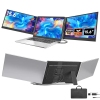
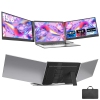
**TUTT P7 15.6" Triple Screen Portable Monitor – 1080p FHD IPS | Dual USB-C + HDMI Setup**
Transform your laptop into a professional three-screen workstation in under 30 seconds. The TUTT P7 is engineered for maximum productivity, featuring dual 15.6-inch Full HD IPS displays that fold out to create an immersive, high-resolution mobile office. Whether you are a trader monitoring real-time data, a developer reviewing code, or a designer on the move, the P7 provides the screen real estate you need without the bulk of traditional monitors.
---
TUTT™ H5 2-in-1 Conversion Cable: Required for 1080P dual-monitor extension on Mac (M1–M4) and Windows systems without a full-featured USB-C port.
⚠️ Attention: Driver installation is required. If using a corporate or government laptop, please verify you have IT permission before installing.
---
**Key Features**
**Instant Triple-Screen Productivity:** Unfold two 15.6" screens from a single unit that stands independently behind your laptop. No clamps or permanent mounts required.
**Vibrant FHD IPS Displays:** Enjoy 1920x1080 resolution at 60Hz. IPS technology ensures consistent color accuracy and wide viewing angles, perfect for multi-person reviews.
**Flexible Orientation:** Both panels rotate up to 180°, supporting both Landscape and Portrait modes—ideal for long documents, social feeds, or coding.
**Broad Compatibility:** Supports Windows 10/11, macOS (including M1–M4 chips), Chrome OS, Linux, and Android (Samsung DeX/Huawei Desktop).
**Gaming & Mobile Ready:** Connect your Nintendo Switch, PlayStation, or Xbox via HDMI, or expand your smartphone’s workspace via USB-C.
**Integrated Audio & Controls:** Features built-in speakers and independent hardware buttons on each panel for quick adjustments to brightness, volume, and contrast.
**TUTT™ H5 Conversion Cable Included:** Specifically included to enable dual-monitor extension on Mac (M1–M4) and Windows systems that lack two full-featured USB-C ports.
**Ultra-Portable Design:** Slim 22.1 mm profile when folded. Includes a premium leather carry bag for safe transport.
---
**Technical Specifications**
*Model:P7 (Triple Screen Laptop Extender)
*Screen Size: 15.6 inches (per panel)
*Resolution: 1920 × 1080 (Full HD / 1080p)
*Panel Type: IPS LCD (Wide viewing angle)
*Refresh Rate: 60 Hz
*Average Brightness: 280 cd/m²
*Aspect Ratio: 16:9
*Screen Rotation:0°–180°
*Ports:2x USB-C (Video/Data), 1x USB-C PD (Power Input)
*Power Input: 5V–20V / 5A Max
*Speaker:1 built-in speaker per panel (OS selectable)
*Compatible Laptop Sizes: 13″ – 17.3″
*Weight:1.82 kg (Approx. 4.0 lbs)
*Folded Dimensions: 381 × 238.5 × 22.1 mm
---
**What’s in the Box**
* TUTT P7 Triple-Screen Monitor Unit
* 1x TUTT™ H5 2-in-1 Video Transmission Cable
* 1x USB-C to USB-C Cable
* 1x HD (HDMI) to Type-C Cable
* 1x USB-A to USB-C Cable
* Dedicated Power Adapter (5V–20V)
* Premium Leather Carry Bag
* User Manual
* 1 × H5 2-in-1 Video Transmission Cable (for MacBook M1/M2/M3/M4)
---
How to Connect:
Compatible Models: TUTT S3 | S6 | F3 | S2 Mini | P7 – Dual Screen Portable Monitors
Connection instructions vary depending on your laptop’s available ports. Please review the options below:
1. HDMI + Full-Featured USB-C (Thunderbolt)
Recommended Setup for Best Performance
First Screen
•Connect a full-featured USB-C cable directly from your laptop to the USB-C port on the first screen.
•No external power is required.
Second Screen
•Connect HDMI from your laptop to the HDMI/DP (typically red-marked) port on the second screen.
•Use a USB-C cable to supply power to the second screen.
Note: While the second screen may receive power from the laptop, external power is strongly recommended for stable performance.
————————————————————-
2. HDMI + Regular USB-C or USB-A
When Your Laptop Does Not Support Thunderbolt USB-C
First Screen
•Connect HDMI from your laptop to the HDMI/DP (typically red-marked) port on the screen.
•Power the screen using a USB-C cable connected to an external power source (recommended).
Powering from laptop is possible but not advised for long sessions.
Second Screen
•Connect the included H5 conversion cable (USB-C + USB-A heads) to your laptop.
•Connect the USB-C end of the H5 cable to the HDMI/DP (red) port on the second screen.
•Use an external USB-C cable to power the second screen.
•A blue screen with connection icons should appear.
•Locate and install the “Display” driver on your laptop.
– If no display appears, restart your system after driver installation.
————————————————————-
3. MacBooks with One Full-Featured USB-C + One Regular USB-C
For Mac M1, M2, M3 Series and Newer Models
First Screen
•Connect a full-featured USB-C cable directly to the first screen.
•No external power required.
Second Screen
•Connect the included H5 conversion cable (USB-C + USB-A heads) to your MacBook.
•Plug the USB-C end of the H5 cable into the HDMI/DP (red) port on the second screen.
•Power the screen using a separate USB-C cable connected to an external power source.
•A blue connection screen should appear.
•Locate and install the “Display” driver on your Mac.
– Restart your Mac if the second screen doesn’t activate immediately
**Professional Canadian Support**
All TUTT™ products are backed by **Good Dragons®** (Takcan Inc.), headquartered in Toronto. We provide certified Canadian technical support with a 90-minute response guarantee for setup assistance. Video call support is available upon request to ensure your workstation is running perfectly.