PS5 Controllers
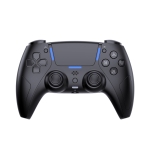
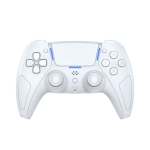
Find the right PS5 controllers for how you play
PS5 controllers come in a range of styles, from the standard DualSense wireless controller to pro-level and specialty options. Whether you need a second controller, an upgrade, or something more tailored, this collection includes official PlayStation 5 controllers, DualSense Edge models, and unique formats like accessibility controllers and fight sticks.
The DualSense wireless controller is the go-to choice for most players. Designed specifically for PS5, it delivers responsive controls and immersive features across a wide range of games. It’s available in multiple finishes, including classic white, black, blue, red, camo, and limited edition designs, making it easy to match your setup or personal style.
What makes the DualSense controller different
The PlayStation 5 DualSense controller builds on previous generations with features that enhance gameplay in subtle but noticeable ways.
- Haptic feedback
- Adaptive triggers
- Built-in microphone and speaker
- Motion controls and touchpad
Compared to the DualShock 4, the DualSense offers more immersive feedback and is designed specifically for PS5 titles. While DualShock 4 controllers can still be used with some PS4 games on PS5, most newer games are built for DualSense.
DualSense Edge and pro PS5 controller options
For players who want more control over how their controller performs, the DualSense Edge controller offers added customization.
This PS5 pro controller option is designed for competitive and advanced play, with features such as:
- Remappable buttons
- Adjustable trigger sensitivity
- Swappable stick modules
- Custom control profiles
These features make it easier to fine-tune settings for different games, whether focusing on precision, speed, or comfort.
Specialty PlayStation 5 controllers
In addition to standard and pro controllers, this category includes specialty devices built for specific play styles.
- Access controller
- Fight sticks
These options expand beyond the traditional controller format and give players more ways to play.
Charging, accessories, and everyday use
Many players pick up accessories alongside a new PS5 controller to improve convenience and protection.
Common add-ons include:
- Charging docks and cables
- Controller cases for travel and storage
- Covers and skins for grip and customization
- Replacement shells and protective accessories
Battery life for the DualSense controller typically lasts around 6 to 12 hours, depending on the game and features in use. Keeping a second controller or a charger nearby can help avoid interruptions during longer sessions.
Getting started with your PS5 controller
Setting up a PS5 controller is straightforward. To pair a DualSense controller with a PlayStation 5 console, connect it using a USB cable and press the PS button. Once paired, it will connect wirelessly.
The DualSense controller can also be used with other devices:
- PC: connect via USB-C or Bluetooth
- Phone: pair through Bluetooth for supported games and remote play
Firmware updates are handled through the PS5 system, helping keep the controller running smoothly over time.
PS5 Controller FAQs
What is the PlayStation 5 DualSense controller?
The DualSense is Sony’s official wireless PS5 controller, featuring haptic feedback, adaptive triggers, and built-in audio features.
What are the main features of the DualSense controller?
Haptic feedback, adaptive triggers, wireless connectivity, built-in microphone, motion controls, and a touchpad.
How do you pair a DualSense controller with a PS5?
Connect the controller with a USB cable and press the PS button to pair it.
How do you connect a DualSense controller to a PC?
Use a USB-C cable or pair through Bluetooth by putting the controller into pairing mode.
How do you connect a DualSense controller to a phone?
Enable Bluetooth pairing mode on the controller, then select it from your phone’s Bluetooth settings.
How long does the DualSense controller battery last?
Typically around 6 to 12 hours, depending on usage and enabled features.
How do you update the DualSense controller firmware?
Updates are installed through the PS5 when the controller is connected.
How do you reset a PS5 DualSense controller?
Press the small reset button on the back using a pin, then reconnect it to the console.
DualSense vs DualShock 4: what are the differences?
DualSense includes enhanced feedback and is designed for PS5, while DualShock 4 is built for PS4 and has limited PS5 compatibility.