

 Shop
Shop

 Latest and Greatest Tech
 Brands


 Computers, Tablets, & Accessories
 Cell Phones, Plans & Accessories
 Office Supplies & Ink
 TV & Home Theatre
 Headphones, Speakers, & Audio
 Cameras, Action Cameras, & Drones
 Car Tech and GPS
 Appliances
 Smart Home
 Home Living
 Baby & Maternity
 Video Games & VR
 Wearable Technology
 Health & Fitness
 Sports, Recreation, & Transportation
 Movies & Music
 Musical Instruments & Equipment
 Toys, Games, & Education
 Beauty
 Personal Care
 Travel, Luggage, & Bags
 Watches, Jewelry, & Fashion
 Gift Cards
 3-Day Flash Sale
 Deals
Deals
 Phones & Plans
 Outlet
 Services
Xiaomi Pad 7

What to Consider When Buying a Xiaomi Pad 7?
Screen size and resolution matter for clarity when watching videos, reading, or sketching notes. Look for a bright, crisp display and a compact, lightweight form factor that fits your bag or backpack for on‑the‑go use.
Battery life is essential for long study sessions or travel. Consider models with efficient software and a large battery capacity to minimize interruptions between charges.
Storage options and RAM affect how many apps you can run smoothly and how many files you can keep locally. Decide whether you need more internal storage or plan to rely on cloud storage and microSD expansion (where available).
Connectivity matters. Decide between Wi‑Fi only and cellular models based on where you’ll use the tablet most—home, school, or on the move. Ensure compatibility with Bluetooth accessories, keyboards, and external displays.
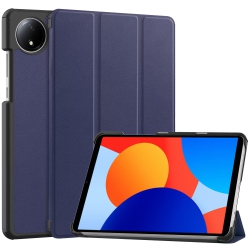
Accessory ecosystem boosts the Xiaomi Pad 7 experience. Look for cases, screen protectors, USB-C chargers, and compatible stylus options to maximize productivity and protection during travel.
What Are the Most Popular Xiaomi Pad 7 Configurations?
People frequently choose Wi‑Fi only configurations for everyday tasks, streaming, and note-taking. Cellular variants appeal to commuters and travelers who want reliable internet on the go without hunting for public networks.
Storage-aware buyers often prefer higher internal storage options if they plan to store media, documents, and large apps offline. A microSD expansion option can also help you increase capacity without upgrading to a new tablet.
Accessory bundles are a popular choice to maximize value. Kits that include a protective case, screen protector, and a keyboard dock or stand turn the tablet into a lightweight productivity device for writing, presentations, and multitasking.
How to Maintain Your Xiaomi Pad 7?
Regular software updates from Xiaomi improve security, performance, and access to new features. Keep your tablet current through Settings, with automatic updates enabled when possible.
Clean the screen with a soft microfiber cloth and avoid harsh cleaners that can damage coatings. Use a protective case to protect the edges and corners from daily wear and accidental drops.
Manage storage by regularly transferring photos, videos, and documents to the cloud or a computer. Uninstall unused apps to keep the user experience fast and responsive.
Protect your investment with a reliable case, tempered glass screen protector, and a trusted USB-C charger. When you’re ready, browse Best Buy Canada for compatible accessories and upgrade options to extend the life of your Xiaomi Pad 7.
How to Get the Most Out of Your Xiaomi Pad 7 for Work and Study?
Use the tablet for note-taking in meetings or classrooms by pairing a Bluetooth keyboard and a stylus (sold separately) for precise input. The large display is ideal for reading textbooks, reviewing documents, and annotating PDFs.
Cloud storage and cross‑device syncing help you access files from your laptop, phone, and tablet, ensuring you always have the latest version of your work. Consider a stand or keyboard dock to transform the Pad 7 into a compact productivity station.
For entertainment, you can stream high‑quality video, browse the web, and enjoy casual gaming. The tablet’s portability makes it a great travel companion for downtime on commutes or flights.
What makes the Xiaomi Pad 7 a good value among Android tablets?
The Xiaomi Pad 7 combines a well‑rounded display, versatile Android experience, and access to Google Play with a price point that appeals to students and budget‑mensitive buyers. It’s compatible with a broad line of accessories, which helps you personalize your setup without overspending.
Its balance of lightweight design, responsive performance, and long battery life makes it a practical option for everyday tasks and entertainment, all backed by Best Buy Canada’s customer service and warranty options.
Is the Xiaomi Pad 7 compatible with Google Play and Android apps?
Yes. The Xiaomi Pad 7 runs Android and supports Google Play, giving you access to a vast library of apps, games, productivity tools, and streaming services. You can install your favourites, manage updates, and customize notifications just like on other Android devices.
If you’re transitioning from another Android tablet or phone, you’ll appreciate seamless integration with your Google account, contacts, calendars, and cloud storage services.
Recommendations
Some products may be subject to Environmental Handling Fees (EHF) depending on your province. Learn more about EHFs