Emergency Preparedness Tech Essentials
Power outages and severe weather happen. Get set with backup power, reliable lighting, emergency radios, and connected home tech that helps you stay informed and in touch.
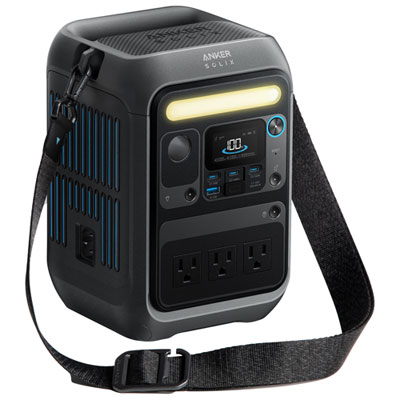
Portable Power Stations
Charge phones, run small appliances, and keep essentials powered with portable backup solutions.
UPS Battery Backups
Keep your modem, router, and computer gear running long enough to save work and stay connected.
Power Banks
Pocket-sized power for phones and tablets—ideal for go-bags, commutes, and short outages.
Flashlights, Lanterns, and Headlamps
Reliable lighting for blackouts, basements, and nighttime check-ins—hands-free options included.
Emergency Weather Radios
Stay on top of alerts with portable radios that can also include charging and built-in lights.
Security Cameras
Add visibility at home with battery-powered cameras designed for flexible placement indoors or outdoors.
Satellite Communicators
For trips beyond cell coverage, use satellite-based messaging devices to share location and send updates.
Tips
- Start with your must-runs list (phone charging, modem/router, a lamp, and a small fan or medical devices) so you can choose the right wattage and capacity.
- Pair a UPS battery backup with your modem and router to keep Wi-Fi running during short outages and to help protect gear from power spikes.
- Look for multiple output types (AC outlets, USB-C, USB-A, and 12V) so one power source can handle more of your everyday essentials.
- Keep a few light sources in easy-to-reach spots (bedroom, kitchen, and car): a flashlight for quick checks and a lantern or headlamp for hands-free use.
- Add an emergency weather radio for alerts when your phone signal or internet is spotty—hand-crank and rechargeable models can be especially handy.
- For longer interruptions, use a larger portable power station for small appliances, and smaller power banks for phones and tablets so you can spread out your run time.
- Test your setup before you need it: charge devices, confirm cables fit, and do a quick run-through of where everything is stored.
- If you want extra peace of mind at home, consider wire-free security cameras so you can keep an eye on key areas even when you’re away.
Frequently Asked Questions
A UPS battery backup is designed for computers and networking gear, providing quick battery power when the electricity cuts out (often with surge protection). A portable power station is built for flexible use and higher output—great for charging multiple devices or running small appliances when you’re not near an outlet.
Check two things: output (watts) and capacity (watt-hours). Output tells you what it can power at once, while capacity helps estimate how long it can run your devices. Add up the watts of what you want to power, then pick a capacity that matches the run time you need.
Your modem, router, and a small network switch are top picks—keeping internet up can help with updates and communication. If you work from home, add a desktop computer or monitor as well, but remember that more devices will reduce battery run time.
Power banks are great for phones, tablets, and small USB devices, especially for short outages or when you’re away from home. For longer interruptions or for devices that need AC power, a portable power station is the better next step.
A weather radio is a helpful backup when mobile data is slow, service is down, or you need alerts without constantly checking your phone. Many models also add features like flashlights and phone charging.
Wire-free, battery-powered cameras can keep recording and sending alerts as long as they have charge and a connection. Pairing your modem/router with a UPS can also help keep your home network online during short outages.
Some products may be subject to EHF depending on your province. Learn more about EHFs.