Colorful & Aesthetic Tech: Pastel Gear, RGB Glow, and Setup-Ready Picks
Add personality to your desk, game room, or on-the-go kit with colourful tech—from RGB lighting and compact keyboards to pastel controllers, pocket photo printers, and cute cases.
RGB Light Strips & Neon Rope Lights
Backlight your monitor, shelves, or wall art with colour-changing strips and app-controlled effects.
Colour-Pop Speakers (With Light Effects)
Big sound, bold glow—perfect for playlists, study sessions, and weekend hangouts.
Cute & Colourful Earbuds and Headphones
Add a pop of colour to your commute, workouts, and gaming—without giving up comfort or features.
Instant Cameras & Pocket Photo Printers
Turn your camera roll into prints you can share, stick, frame, or gift.
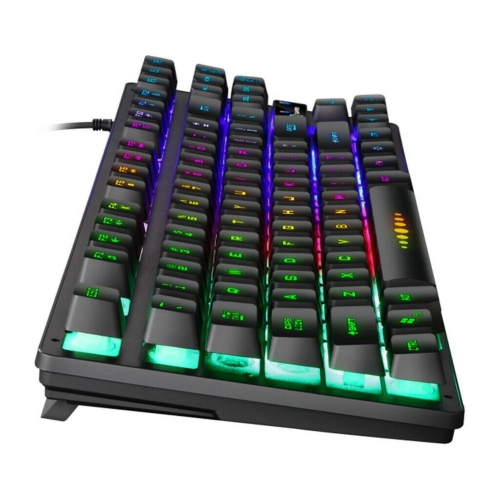
Compact RGB Keyboards
Smaller footprints, bigger vibes—create a clean desk setup with customizable backlighting.
Aesthetic Gaming Mice (White + RGB)
Lightweight, responsive, and setup-friendly—dial in your look and your performance.
Pastel Joy-Con Controllers
Give your console a colour refresh with pastel and light-tone controller sets.
Colourful Cases & Carry
The easiest glow-up: protective cases and clips that add personality to your everyday tech.
Tips
- Pick a simple palette (2–3 colours) and repeat it across your keyboard, mouse, lighting, and accessories for a pulled-together look.
- Mount LED strips behind your monitor or under your desk and aim them at a wall or panel to get a softer glow instead of visible hotspots.
- If you want a clean setup, go compact: a 65% or TKL keyboard saves space and leaves more room for your mouse and speaker.
- Mix-and-match RGB gear? Look for devices with easy preset modes, or keep everything on one colour for a calm vibe.
- Go wireless where it makes sense (mouse, earbuds, speakers) to cut down on cable clutter—then route the remaining cables behind the desk.
- For portable speakers with lights, make sure you can toggle the LEDs on/off so you can switch from party mode to low-key listening.
- Choosing earbuds vs. headphones: earbuds are easy to stash, while on-ear/over-ear styles can feel more comfortable for long sessions.
- Pocket photo printers are a fun add-on for journaling and scrapbooks—keep extra paper on hand so you can print whenever inspiration hits.
Frequently Asked Questions
RGB stands for red, green, and blue lighting. Most RGB gear lets you pick a single solid colour, cycle effects, or choose preset patterns—so you can go bold or keep it minimal.
Try placing strips behind your monitor, along the back edge of your desk, or under shelving. For the cleanest look, hide the strip itself and let the light bounce off a wall or surface.
Some connect directly by Wi-Fi or Bluetooth through an app, while others are simple USB strips with a remote. Check the product details to see what you need for setup and control.
Nintendo Switch Joy-Con controllers work with Nintendo Switch systems, but accessories made specifically for Nintendo Switch 2 are designed for that console. Always confirm the product listing matches your console generation.
Most models connect by Bluetooth and use a companion app for editing and printing. Compatibility can vary by brand, so check the supported devices and app requirements before you buy.
Stick to a theme, keep cables routed behind your desk, and choose one “statement” item (like a light strip or pastel controller) to lead the look. A little planning makes the colour feel intentional.