Small Space Setup Ideas
Make every square foot work harder with compact desks, smart storage, flexible seating, and tidy tech accessories designed for small-space setups at home.
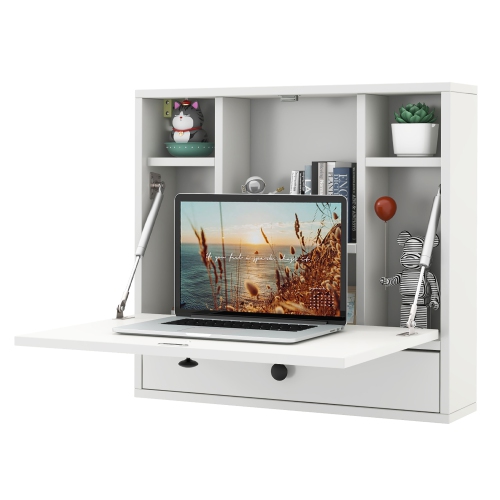
Wall-Mounted and Foldable Desks
Create a workspace when you need it and keep your room open when you do not.
Corner and L-Shaped Desks
Use corners more efficiently with layouts that give you extra surface area without overwhelming the room.
Desks With Built-In Storage
Keep books, accessories, and everyday gear close by with desks that add shelves and storage.
Desktop Organization and Cable Management
Clear the clutter with monitor risers and cable solutions that help small desks stay functional.
Rolling Storage for Tight Spaces
Add flexible storage that can move with your setup and slide neatly into narrow spots.
Compact Tech for Small Desks
Choose slimmer accessories that fit comfortably on compact surfaces without sacrificing usability.
Tips
- Choose furniture that uses wall space or corners first so you can keep more open floor area.
- Look for desks with built-in shelves, monitor stands, or storage to reduce the need for extra pieces.
- Use vertical storage like narrow shelves and risers to keep essentials close without crowding your desktop.
- Pick foldable or floating desks when your workspace needs to share a room with living or sleeping space.
- Tuck printers, chargers, and office supplies onto rolling carts or under-desk storage to keep the main surface clear.
- Use cable trays and compact power solutions to prevent cords from taking over a small setup.
- An armless or compact chair can help a workstation slide neatly under the desk when not in use.
Frequently Asked Questions
Compact desks, corner desks, foldable desks, and wall-mounted desks are great starting points. Pieces with built-in shelving or storage can help you do more with less floor space.
Start with a smaller desk footprint, then add vertical storage, a monitor riser, and simple cable management. Keeping chargers, paper, and accessories off the main work surface can make the whole setup feel cleaner.
Yes. Corner desks can make use of underused space and help open up the middle of the room. They are especially handy when you need room for a monitor, keyboard, and a few daily essentials.
If you need a workspace that can disappear between tasks, a foldable or floating desk is a smart option. These styles work well in condos, bedrooms, dorm-style rooms, and multipurpose spaces.
Monitor risers, slim keyboard and mouse combos, under-desk cable trays, and compact speakers can help maximize function without taking up too much room. The goal is to keep your setup comfortable, organized, and easy to use.
Some products may be subject to Environmental Handling Fees (EHF) depending on your province. Learn more about EHFs.