Durable Gaming Laptops
Discover the ultimate blend of power and resilience with a durable gaming laptop, designed to elevate your gaming experience to new heights. Perfect for gamers who demand performance and dependability, these laptops are built to withstand intense gaming sessions while delivering stunning graphics and seamless gameplay. Whether you're diving into expansive open worlds or engaging in fast-paced battles, a durable gaming laptop ensures you stay ahead of the competition without missing a beat. Explore this selection to find the ideal companion for your gaming adventures, where durability meets exceptional performance.
Sort



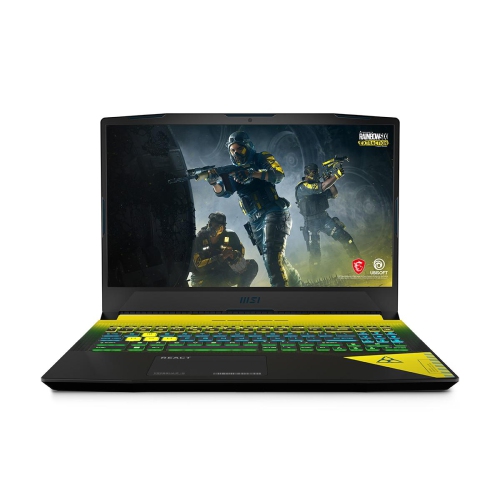
Why laptop durability goes beyond a tough-looking case
Durable gaming laptops combine the performance needed for demanding games with construction suited to repeated use, regular transport, and long sessions at a desk. Their appeal goes beyond a tough-looking case: a well-supported keyboard, stable hinges, protected screen edges, and a chassis that resists excessive flex all contribute to a machine that feels dependable day after day. Aluminium, magnesium alloy, and reinforced plastic can each play a role in a sturdy design, although material alone does not establish how well a laptop will withstand wear. The way the lid, base, hinges, and internal components fit together matters just as much. For a student carrying a computer between lectures and evening gaming sessions, or someone sharing desk space between work and play, these details can make everyday handling feel more reassuring. Some gaming laptops carry claims based on MIL-STD-810H testing, which can involve exposure to vibration, shock, temperature changes, or other specified conditions. Such claims are most useful when the manufacturer identifies the tests performed and the conditions used; they do not mean a laptop is indestructible, waterproof, or guaranteed to survive a fall. A gaming laptop with durability testing also is not necessarily a fully rugged computer designed for fieldwork. For ordinary travel and home use, practical details often deserve equal attention: feet that keep the base steady, a lid that opens smoothly without twisting, and ports positioned where cables will not be constantly knocked. A reinforced build can be especially useful when a laptop moves from a bedroom desk to a campus study room or a friend's gaming setup. Even then, careful handling remains important. A padded sleeve or fitted laptop compartment helps protect the finish and corners, while keeping the power adapter separate prevents its hard edges from pressing against the lid. Durability is best understood as a combination of thoughtful construction, documented testing where provided, and sensible daily care rather than a single badge or design feature.
Gaming performance and physical durability meet most clearly in the cooling system. A powerful processor and dedicated graphics hardware produce heat, particularly during extended multiplayer matches, detailed open-world games, or video editing after a recording session. Cooling designs with adequate airflow, substantial heatsinks, and well-placed vents help manage that heat so the laptop can maintain performance within its operating limits. Multiple fans can support cooling, but fan count alone says little about overall effectiveness; the internal layout, power settings, room temperature, and condition of the vents also matter. Features intended to reduce dust accumulation can be helpful, though they do not eliminate the need for cleaning. A firm, flat surface leaves more room for air to move than a blanket, sofa cushion, or lap that covers the underside. On a crowded desk, leaving clearance around the exhaust vents is a small habit with a practical payoff. Performance specifications deserve the same attention as the casing. The graphics processor should suit the games and screen resolution involved, while sufficient memory and solid-state storage help support multitasking, loading, and a growing game library. A high-refresh-rate display can make motion appear smoother when the system produces enough frames, but it does not replace capable graphics hardware. Screen size also affects daily use: a 16-inch display can offer comfortable viewing at a shared desk, while a larger chassis may require more room in a bag and on a small table. Keyboard layout, key feel, and palm-rest comfort become noticeable during a long evening, especially when the same laptop handles assignments or work throughout the day. Published keyboard endurance figures, where provided, describe a particular test rather than a promise that every key will last indefinitely. Accessible memory or storage slots can offer flexibility later, but upgrade options vary, and opening the chassis should follow the manufacturer's service instructions. Battery life also varies with workload; intensive gaming commonly requires mains power for the highest performance, making the size and weight of the adapter part of the carrying decision.
The right balance of strength, weight, and convenience depends on where a gaming laptop will spend its time. A computer that mostly stays on a desk may benefit from a larger screen, generous cooling space, and enough connections for a monitor, headset, mouse, and wired network. One that travels regularly has different demands: a manageable combined weight, a secure fit in a backpack, and a lid that stays protected when books or other belongings share the bag. For shoppers whose routines involve more commuting and lighter gaming, Durable Travel Laptops offers a related category to consider alongside gaming-focused designs. Connection placement is worth noticing in either case. A charging cable stretched across a walkway can pull a computer off a table, while tightly bent cables put unnecessary strain on plugs and sockets. At home, routing leads away from elbows and chair wheels helps keep a setup orderly and reduces accidental tugs. During the cooler months, a laptop brought indoors from a cold vehicle should be allowed to reach room temperature before use, following the manufacturer's temperature guidance, particularly if moisture has formed on its surfaces. Routine care is generally straightforward: shut the computer down before cleaning, use a soft cloth suitable for its finish, and avoid spraying liquid directly onto the screen or keyboard. Vent cleaning should follow the supplied instructions rather than pushing dust farther inside, and drinks are best kept beyond easy spilling distance unless a clearly documented protection feature states otherwise. For a gift recipient, the most useful match is often a laptop suited to both their favourite games and their everyday routine, whether that means study, creative projects, or visits with friends. A sturdy build cannot compensate for unsuitable performance or an uncomfortable layout. Durable gaming laptops make the most sense when their construction, cooling, controls, and portability work together, supporting the familiar rhythm of opening the lid, settling into a game, and packing up safely when the session ends.
Gaming performance and physical durability meet most clearly in the cooling system. A powerful processor and dedicated graphics hardware produce heat, particularly during extended multiplayer matches, detailed open-world games, or video editing after a recording session. Cooling designs with adequate airflow, substantial heatsinks, and well-placed vents help manage that heat so the laptop can maintain performance within its operating limits. Multiple fans can support cooling, but fan count alone says little about overall effectiveness; the internal layout, power settings, room temperature, and condition of the vents also matter. Features intended to reduce dust accumulation can be helpful, though they do not eliminate the need for cleaning. A firm, flat surface leaves more room for air to move than a blanket, sofa cushion, or lap that covers the underside. On a crowded desk, leaving clearance around the exhaust vents is a small habit with a practical payoff. Performance specifications deserve the same attention as the casing. The graphics processor should suit the games and screen resolution involved, while sufficient memory and solid-state storage help support multitasking, loading, and a growing game library. A high-refresh-rate display can make motion appear smoother when the system produces enough frames, but it does not replace capable graphics hardware. Screen size also affects daily use: a 16-inch display can offer comfortable viewing at a shared desk, while a larger chassis may require more room in a bag and on a small table. Keyboard layout, key feel, and palm-rest comfort become noticeable during a long evening, especially when the same laptop handles assignments or work throughout the day. Published keyboard endurance figures, where provided, describe a particular test rather than a promise that every key will last indefinitely. Accessible memory or storage slots can offer flexibility later, but upgrade options vary, and opening the chassis should follow the manufacturer's service instructions. Battery life also varies with workload; intensive gaming commonly requires mains power for the highest performance, making the size and weight of the adapter part of the carrying decision.
The right balance of strength, weight, and convenience depends on where a gaming laptop will spend its time. A computer that mostly stays on a desk may benefit from a larger screen, generous cooling space, and enough connections for a monitor, headset, mouse, and wired network. One that travels regularly has different demands: a manageable combined weight, a secure fit in a backpack, and a lid that stays protected when books or other belongings share the bag. For shoppers whose routines involve more commuting and lighter gaming, Durable Travel Laptops offers a related category to consider alongside gaming-focused designs. Connection placement is worth noticing in either case. A charging cable stretched across a walkway can pull a computer off a table, while tightly bent cables put unnecessary strain on plugs and sockets. At home, routing leads away from elbows and chair wheels helps keep a setup orderly and reduces accidental tugs. During the cooler months, a laptop brought indoors from a cold vehicle should be allowed to reach room temperature before use, following the manufacturer's temperature guidance, particularly if moisture has formed on its surfaces. Routine care is generally straightforward: shut the computer down before cleaning, use a soft cloth suitable for its finish, and avoid spraying liquid directly onto the screen or keyboard. Vent cleaning should follow the supplied instructions rather than pushing dust farther inside, and drinks are best kept beyond easy spilling distance unless a clearly documented protection feature states otherwise. For a gift recipient, the most useful match is often a laptop suited to both their favourite games and their everyday routine, whether that means study, creative projects, or visits with friends. A sturdy build cannot compensate for unsuitable performance or an uncomfortable layout. Durable gaming laptops make the most sense when their construction, cooling, controls, and portability work together, supporting the familiar rhythm of opening the lid, settling into a game, and packing up safely when the session ends.
Top selling and popular products
-
 Your price for this item is $1500
 -
 Your price for this item is $749.77
 -
 Your price for this item is $649.77
 -
 Your price for this item is $549.77
 -
 Your price for this item is $699.77
 -
 Your price for this item is $2299.97
 -
 Your price for this item is $679.77
 -
 Your price for this item is $1599.97
Discover more categories related to Durable Gaming Laptops



Top Collections:
Pokemon Centers, Kindle Devices, Best Budget Office Chairs, Apple iPhones 16, Best Laptops for Writers, iPhone 15 Apple, Canon G7X Cameras, Refurbished Apple Laptops, Alarm Clock, Motorola Razr Phones
Some products may be subject to Environmental Handling Fees
(EHF) depending on your province.
Learn more about EHFs.