Intel Arc 750
Unlock new possibilities in computing with the Intel Arc 750. Designed for those who demand enhanced performance and versatility, this graphics solution is ideal for gaming, creative projects, and everyday tasks. Explore a range of options that deliver smooth visuals and responsive experiences, making the Intel Arc 750 a standout choice for upgrading your PC setup. Find the right fit to elevate your system and enjoy seamless multitasking, immersive entertainment, and more.
Sort
What matters for balanced 1080p and 1440p gaming
A dedicated desktop graphics card adds the processing power needed for detailed games, high-resolution displays, and supported creative applications. For a gaming PC built around 1080p or 1440p play, the most useful balance is between image quality, frame rate, and compatibility with the rest of the system. At 1080p, a capable mid-range graphics card can suit everything from fast multiplayer matches to richly textured single-player adventures. Moving to 1440p provides a sharper picture on a suitably sized monitor, but also increases the workload, so demanding games may benefit from adjusted shadows, reflections, or texture settings. Performance varies by game, graphics settings, processor, and driver version; a resolution alone does not guarantee a particular frame rate. An 8GB GDDR6 memory configuration provides space for textures and other graphics data, although some demanding games can exceed that capacity with very high texture settings. A 256-bit memory interface helps move that data between graphics memory and the processor, but memory width and clock speed should not be treated as standalone measures of gaming performance. Hardware-accelerated ray tracing can add more lifelike reflections, lighting, and shadows in supported games, with an additional performance cost. Supported AI-assisted upscaling can improve frame rates by rendering at a lower internal resolution and reconstructing the output image. The results depend on the game, output resolution, and quality setting, with finer details sometimes looking different from native rendering. These features matter most when they match how the computer will actually be used. Someone playing competitive games may favour responsive controls and consistently smooth motion, while someone exploring a detailed landscape may prefer richer lighting and a quieter fan profile. For a shared household computer, a discrete graphics card can also support photo work, video editing, and multiple displays, provided the applications and display connections are compatible.
Physical fit and system compatibility are just as important as graphics specifications. Desktop graphics cards use a motherboard expansion slot, and a PCIe 4.0 x16 interface is intended for a compatible full-length slot with the appropriate clearance. A card may operate through an earlier PCIe generation, but the overall platform still needs to meet its requirements. Resizable BAR is especially important for graphics architectures designed to depend on it: this feature lets the processor access larger portions of graphics memory, and leaving it disabled can substantially reduce performance. Support involves the processor, motherboard, and firmware settings rather than the graphics card alone. A compatible system may need a motherboard firmware update, UEFI boot mode, and Above 4G Decoding enabled before Resizable BAR can be activated. The motherboard documentation is the appropriate reference, particularly for an older desktop being upgraded. Power requirements also extend beyond the number printed on a power supply. A graphics card with a board power rating around 225 watts needs sufficient capacity for the processor, storage, cooling, and other components, along with the correct PCIe power connectors. Power supplies in the 550- to 650-watt range may suit some configurations, but the card manufacturer’s recommendation and the complete system load should determine the choice. A prebuilt desktop can introduce further limits through proprietary connectors, a smaller power supply, or restricted internal space. Card length, height, and slot thickness all affect fit, as does the space needed to route power cables without pressing them against a side panel. Front-mounted radiators and drive cages can reduce usable clearance even in a case that looks roomy from the outside. Compact systems deserve particular attention: Intel NUC Mini PCs use a different form factor, and many mini PCs cannot accommodate a full-size internal desktop graphics card. An external graphics connection is only an option when the computer, interface, and enclosure explicitly support it.
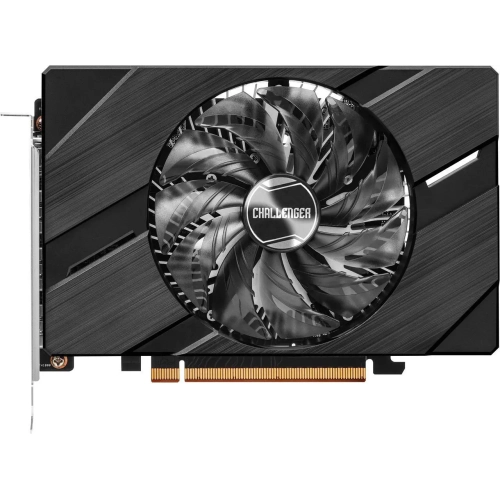
Cooling design, construction, and software support shape the experience long after installation. Graphics cards typically combine a printed circuit board with a metal heatsink, cooling fans, and a protective shroud; some also include a backplate for added rigidity. The number of fans does not tell the whole story about cooling or noise. Heatsink size, fan tuning, case ventilation, and the length of a gaming session all influence how a card behaves under load. A system tucked into a closed desk compartment may run warmer and louder than the same hardware in an open, well-ventilated space. Keeping intake vents clear and removing dust periodically helps maintain airflow. Cleaning should be done with the computer shut down and unplugged, following the hardware manufacturer’s directions and avoiding household sprays or moisture on internal components. Heavier cards may benefit from a compatible support bracket to limit sag, especially in a tower that is moved occasionally. On the software side, graphics drivers affect game compatibility, stability, and access to supported features, making official driver support an important ownership consideration. Older games and newer titles can behave differently on the same hardware, so results from the actual games being played are more informative than a single benchmark score. For video projects, hardware support for AV1 encoding can be useful when the editing or streaming application supports that format; other workflows may still require different codecs. Monitor connections also deserve a close look. The card’s outputs, cable capabilities, and display inputs must work together to deliver the intended resolution, refresh rate, and number of screens. A student editing footage, a hobbyist streaming gameplay, and a player using a high-refresh-rate monitor can all have different priorities despite needing the same general category of hardware. As a gift for a PC enthusiast, a graphics card is most suitable when the recipient’s case, power supply, platform, and preferred applications are already known. Matching those details helps turn an upgrade into a useful addition rather than a component that needs several other changes before it can be installed.
Physical fit and system compatibility are just as important as graphics specifications. Desktop graphics cards use a motherboard expansion slot, and a PCIe 4.0 x16 interface is intended for a compatible full-length slot with the appropriate clearance. A card may operate through an earlier PCIe generation, but the overall platform still needs to meet its requirements. Resizable BAR is especially important for graphics architectures designed to depend on it: this feature lets the processor access larger portions of graphics memory, and leaving it disabled can substantially reduce performance. Support involves the processor, motherboard, and firmware settings rather than the graphics card alone. A compatible system may need a motherboard firmware update, UEFI boot mode, and Above 4G Decoding enabled before Resizable BAR can be activated. The motherboard documentation is the appropriate reference, particularly for an older desktop being upgraded. Power requirements also extend beyond the number printed on a power supply. A graphics card with a board power rating around 225 watts needs sufficient capacity for the processor, storage, cooling, and other components, along with the correct PCIe power connectors. Power supplies in the 550- to 650-watt range may suit some configurations, but the card manufacturer’s recommendation and the complete system load should determine the choice. A prebuilt desktop can introduce further limits through proprietary connectors, a smaller power supply, or restricted internal space. Card length, height, and slot thickness all affect fit, as does the space needed to route power cables without pressing them against a side panel. Front-mounted radiators and drive cages can reduce usable clearance even in a case that looks roomy from the outside. Compact systems deserve particular attention: Intel NUC Mini PCs use a different form factor, and many mini PCs cannot accommodate a full-size internal desktop graphics card. An external graphics connection is only an option when the computer, interface, and enclosure explicitly support it.
Cooling design, construction, and software support shape the experience long after installation. Graphics cards typically combine a printed circuit board with a metal heatsink, cooling fans, and a protective shroud; some also include a backplate for added rigidity. The number of fans does not tell the whole story about cooling or noise. Heatsink size, fan tuning, case ventilation, and the length of a gaming session all influence how a card behaves under load. A system tucked into a closed desk compartment may run warmer and louder than the same hardware in an open, well-ventilated space. Keeping intake vents clear and removing dust periodically helps maintain airflow. Cleaning should be done with the computer shut down and unplugged, following the hardware manufacturer’s directions and avoiding household sprays or moisture on internal components. Heavier cards may benefit from a compatible support bracket to limit sag, especially in a tower that is moved occasionally. On the software side, graphics drivers affect game compatibility, stability, and access to supported features, making official driver support an important ownership consideration. Older games and newer titles can behave differently on the same hardware, so results from the actual games being played are more informative than a single benchmark score. For video projects, hardware support for AV1 encoding can be useful when the editing or streaming application supports that format; other workflows may still require different codecs. Monitor connections also deserve a close look. The card’s outputs, cable capabilities, and display inputs must work together to deliver the intended resolution, refresh rate, and number of screens. A student editing footage, a hobbyist streaming gameplay, and a player using a high-refresh-rate monitor can all have different priorities despite needing the same general category of hardware. As a gift for a PC enthusiast, a graphics card is most suitable when the recipient’s case, power supply, platform, and preferred applications are already known. Matching those details helps turn an upgrade into a useful addition rather than a component that needs several other changes before it can be installed.
Top selling and popular products
-
 Your price for this item is $449
 -
 Your price for this item is $3099
 -
 Your price for this item is $664.05
 -
 Your price for this item is $599.68
 -
 Your price for this item is $418.98
 -
 Your price for this item is $999.95
 -
 Your price for this item is $749.99
 -
 Your price for this item is $399.99
Discover more categories related to Intel Arc 750
Top Collections:
Pokemon Centers, Budget 4K TVs, Kindle Devices, Canon G7X Cameras, Apple iPhones 16, iPhone 15 Apple, Laptops for Business Work, Flip Phones, Xiaomi Phones, Refurbished Apple Laptops
Some products may be subject to Environmental Handling Fees
(EHF) depending on your province.
Learn more about EHFs.