Monitors with Speakers
Elevate your workspace or entertainment setup with a monitor with speakers, offering an all-in-one solution for both visuals and audio. Whether you're working, gaming, or streaming your favourite shows, these monitors deliver convenience and help reduce desktop clutter by combining display and sound in a single device. Explore a wide range of sizes and styles to find the perfect fit for your needs, making it easy to enjoy clear images and audio without the need for separate speakers. Discover how a monitor with speakers can simplify your setup while enhancing your daily experience.
Sort

Built-in sound leaves more room on your desk
Monitors with speakers combine a computer display and built-in audio output in one device, making them a practical fit for desks where space and simplicity matter. Instead of placing separate speakers beside the screen, the sound comes from speakers housed within the monitor itself. That leaves more room for a keyboard, notebook, or drawing tablet and can reduce the number of cables running across a work surface. Integrated audio suits everyday listening: spoken instructions in an online course, a video call with colleagues, a cooking demonstration playing beside a meal plan, or music at a modest volume while sorting photos. Students, home office workers, and families sharing a computer can all benefit from having sound ready without another piece of desktop equipment. Built-in speakers are particularly useful on a compact desk in a bedroom or a living area where the screen serves several purposes throughout the day. Their main advantage is convenience rather than room-filling sound. Because a monitor’s slim housing leaves limited space for speaker drivers, many built-in systems produce clear enough speech for casual use but have less bass, lower maximum volume, and less detail than dedicated speakers. Performance varies by design, so speaker wattage alone does not tell the whole story; placement, tuning, and the space around the screen also influence what reaches the listener. Downward-firing speakers may sound different on a bare wooden desk than on a surface covered by a large desk mat, while rear-facing speakers can be affected by how close the monitor sits to a wall. In a quiet room, integrated sound may be sufficient for lectures and short videos. In a busy shared space, headphones or separate audio equipment may be more suitable. A monitor with built-in speakers can also make a useful gift for a student or someone setting up a home workspace, particularly when its connections and dimensions suit the computer and desk they already use.
The display remains just as important as the speakers, especially when the monitor will be used for hours at a time. Screen size, resolution, panel type, and stand adjustment all shape how comfortably it fits into a daily routine. A smaller screen can leave breathing room on a narrow desk, while a larger display offers more room for spreadsheets, side-by-side documents, or a video meeting alongside notes. Resolution determines how much detail the screen can show, and its relationship to screen size affects how crisp text and images appear at a normal viewing distance. Full HD can suit general computing, while QHD or 4K provides additional detail and workspace when paired with suitable computer hardware and display scaling. An IPS panel typically offers wide viewing angles, which can help when two people are looking at the same screen. VA panels often provide strong contrast for films and darker scenes, although actual performance depends on the display. Matte screen finishes help soften reflections from nearby windows and lamps, but thoughtful placement still matters; a bright window directly behind the viewer can make any screen harder to see. For gaming, refresh rate, response time, and compatible adaptive sync features deserve attention alongside built-in sound. A higher refresh rate can make motion look smoother when the connected system can deliver enough frames, but it does not improve the speakers’ audio quality. Casual games may work well with integrated audio, while competitive play often benefits from headphones that make directional cues easier to distinguish. For photo work and visual projects, colour accuracy and colour gamut coverage matter more than speaker output. Height adjustment, tilt, swivel, and pivot options can help position the screen comfortably without improvised stacks of books. The stand’s footprint is worth considering too: a wide base may compete with a large keyboard, while a compatible monitor arm can free up surface space if the screen supports the required mounting pattern and the arm supports its weight.
Connections determine how easily a monitor with speakers becomes part of an existing setup. HDMI and DisplayPort can carry both video and audio from a compatible computer or console, allowing the monitor’s speakers to play sound through the same connection used for the picture. USB-C can offer a similarly tidy arrangement on supported devices, but the port, cable, and computer must support the required video and audio functions; a USB-C connector alone does not guarantee them. Some displays also provide laptop charging through USB-C Power Delivery, with charging capability depending on the monitor’s output and the laptop’s needs. Older video-only connections require a separate supported audio path. An audio output or headphone socket does not, by itself, mean a monitor contains speakers, so an explicit built-in speaker specification is important. Once connected, the computer or console may need the monitor selected as its audio output, and both the source volume and the monitor’s own volume controls can affect playback. Built-in speakers also do not automatically include a microphone or webcam. Video meetings still require those features in the computer, monitor, or separate accessories. For households that alternate between a laptop and a console, input selection and accessible sound controls can make the transition easier. Those wanting fuller music playback or stronger film sound can explore Speakers for Monitor for separate audio options, with connection compatibility in mind. Day-to-day care is straightforward: turn the monitor off before cleaning, use a clean microfibre cloth, and follow the manufacturer’s instructions for any approved cleaning solution rather than spraying liquid directly onto the screen. Keep vents and speaker openings clear, and avoid pressing on the panel or pulling cables tight behind the stand. Monitor housings commonly use plastic, while stands may combine plastic and metal; stable construction and secure adjustments matter more than a metallic finish alone. Enough room for ventilation, supported cables, and a firm desk surface help protect the display during regular use. With the right balance of screen quality, comfortable positioning, and straightforward audio, a monitor with speakers can keep an everyday workspace useful without filling it with extra equipment.
The display remains just as important as the speakers, especially when the monitor will be used for hours at a time. Screen size, resolution, panel type, and stand adjustment all shape how comfortably it fits into a daily routine. A smaller screen can leave breathing room on a narrow desk, while a larger display offers more room for spreadsheets, side-by-side documents, or a video meeting alongside notes. Resolution determines how much detail the screen can show, and its relationship to screen size affects how crisp text and images appear at a normal viewing distance. Full HD can suit general computing, while QHD or 4K provides additional detail and workspace when paired with suitable computer hardware and display scaling. An IPS panel typically offers wide viewing angles, which can help when two people are looking at the same screen. VA panels often provide strong contrast for films and darker scenes, although actual performance depends on the display. Matte screen finishes help soften reflections from nearby windows and lamps, but thoughtful placement still matters; a bright window directly behind the viewer can make any screen harder to see. For gaming, refresh rate, response time, and compatible adaptive sync features deserve attention alongside built-in sound. A higher refresh rate can make motion look smoother when the connected system can deliver enough frames, but it does not improve the speakers’ audio quality. Casual games may work well with integrated audio, while competitive play often benefits from headphones that make directional cues easier to distinguish. For photo work and visual projects, colour accuracy and colour gamut coverage matter more than speaker output. Height adjustment, tilt, swivel, and pivot options can help position the screen comfortably without improvised stacks of books. The stand’s footprint is worth considering too: a wide base may compete with a large keyboard, while a compatible monitor arm can free up surface space if the screen supports the required mounting pattern and the arm supports its weight.
Connections determine how easily a monitor with speakers becomes part of an existing setup. HDMI and DisplayPort can carry both video and audio from a compatible computer or console, allowing the monitor’s speakers to play sound through the same connection used for the picture. USB-C can offer a similarly tidy arrangement on supported devices, but the port, cable, and computer must support the required video and audio functions; a USB-C connector alone does not guarantee them. Some displays also provide laptop charging through USB-C Power Delivery, with charging capability depending on the monitor’s output and the laptop’s needs. Older video-only connections require a separate supported audio path. An audio output or headphone socket does not, by itself, mean a monitor contains speakers, so an explicit built-in speaker specification is important. Once connected, the computer or console may need the monitor selected as its audio output, and both the source volume and the monitor’s own volume controls can affect playback. Built-in speakers also do not automatically include a microphone or webcam. Video meetings still require those features in the computer, monitor, or separate accessories. For households that alternate between a laptop and a console, input selection and accessible sound controls can make the transition easier. Those wanting fuller music playback or stronger film sound can explore Speakers for Monitor for separate audio options, with connection compatibility in mind. Day-to-day care is straightforward: turn the monitor off before cleaning, use a clean microfibre cloth, and follow the manufacturer’s instructions for any approved cleaning solution rather than spraying liquid directly onto the screen. Keep vents and speaker openings clear, and avoid pressing on the panel or pulling cables tight behind the stand. Monitor housings commonly use plastic, while stands may combine plastic and metal; stable construction and secure adjustments matter more than a metallic finish alone. Enough room for ventilation, supported cables, and a firm desk surface help protect the display during regular use. With the right balance of screen quality, comfortable positioning, and straightforward audio, a monitor with speakers can keep an everyday workspace useful without filling it with extra equipment.
Top selling and popular products
-
 Your price for this item is $299
 -
 Your price for this item is $469
 -
 Your price for this item is $149.99
 -
 Your price for this item is $329.99
 -
 Your price for this item is $499
 -
 Your price for this item is $199.99
 -
 Your price for this item is $249.99
 -
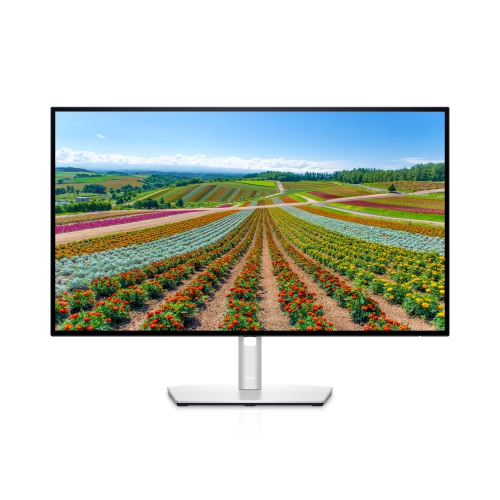 Your price for this item is $569.99
Discover more categories related to Monitors with Speakers
Top Collections:
Pokemon Centers, Best Cameras for Sports Photography, Kindle Devices, Samsung Galaxy Phones, Canon G7X Cameras, Pokémon 30th Celebration Cards, Refurbished Apple Laptops, iPhone 15 Apple, Laptops for Students, Budget Smartphones
Some products may be subject to Environmental Handling Fees
(EHF) depending on your province.
Learn more about EHFs.