Best Stylus for Samsung Tablet
Find the best stylus for your tablet, whether you’re taking notes, sketching, or editing documents. These options are ranked by user review ratings to help you compare shopper favourites. Check compatibility with your tablet model, then consider grip comfort, precision, and supported features to choose a stylus that fits your everyday needs.
What to look for in styluses for Samsung tablets
1. Tablet Compatibility
2. Writing and Drawing Precision
3. Comfort and Tip Options
4. Power and Extra Features
-
1
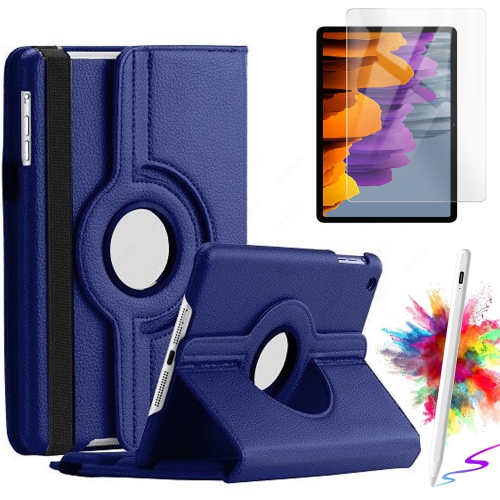
SUPERSHIELD Rotating Case w Screen Protector & Stylus Pen for Samsung Galaxy Tab S10 Lite/ S10 Fe/ S9 Fe 5G 10.9 Inch/tab S9 11 Inch Case Tempered
About this product
A blue synthetic leather rotating case with screen protector and stylus pen for select Samsung Galaxy tablets.
(1)$34.99Your price for this item is $34.99SAVE $15 -
2

OECECA Galaxy Tab S6 Lite Stylus Pen Replacement for Samsung Galaxy Tab S6 Lite Stylus Touch S Pen (Chiffon Rose)
About this product
A chiffon rose stylus pen offering fast, fluid note-taking and comfortable grip for extended tablet use.
$18.99Your price for this item is $18.99SAVE $31 -
3
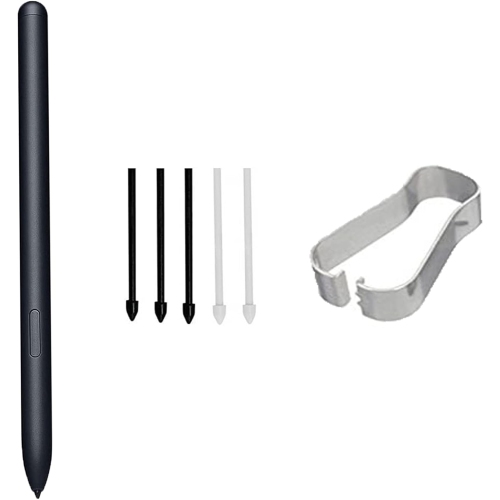
OECECA Galaxy Tab S7 Pen for Samsung Galaxy Tab S7 / S7 Plus / S8 Ultra S Pen Stylus Pen Replacement +Free 5 Tips for Samsung Galaxy Tab S7 Stylus
About this product
A precise stylus pen with 4096 pressure levels and five extra tips for Galaxy Tab S7 series.
$21.99Your price for this item is $21.99SAVE $34 -
4

OECECA Galaxy Tab S8 Stylus Pen Replacement for Samsung Galaxy Tab S8, S8Plus, S8 Ultra S Pen for Tab S7, S7 Plus, S7 Fe S Pen Stylus + Tips/nibs
About this product
A precise stylus pen with extra tips, compatible with multiple Samsung Galaxy Tab S and FE models.
$23.99Your price for this item is $23.99SAVE $38 -
5

OECECA Tab S7 Fe Pen Replacement Pointer Stylus Pen for Samsung Galaxy Tab S7, Tab S7+ Plus, Tab S7 Fe S Pen (Without Bluetooth) Stylus w Tips/nibs
About this product
A precise stylus pen with replacement tips, designed for Samsung Galaxy Tab S7 and S7 FE tablets.
$21.99Your price for this item is $21.99SAVE $34 -
6

ESOURCE PARTS Replacement Stylus Pen for Galaxy Tab S8 (22)(X700/x706)/tab S8 + 5G(X800/x806)/tab S8 Ultra(X900/x906/(Graphite)
About this product
A graphite stylus pen designed for precise input on compatible Galaxy Tab S8 series tablets.
$97.23 Your price for this item is $97.23 -
7

ESOURCE PARTS Stylus Pen for Galaxy Tab S9 11.0"(23)(X710/x716B)/tab S9+ 12.4(X810/x816B)/tab S9 Ultra14.6(X910/x916B)Graphite
About this product
A graphite stylus pen designed for precise input on Galaxy Tab S9, S9+, and S9 Ultra tablets.
$97.23 Your price for this item is $97.23 -
8

ESOURCE PARTS Replacement Stylus Pen for Galaxy Tab S8(22)(X700/x706)/tab S8+ 5G(22)(X800/x806)/tab S8 Ultra(X900 / X906/22)Graphite
About this product
A graphite stylus pen designed for precise input on select Galaxy Tab S8 series tablets.
$48.83 Your price for this item is $48.83 -
9

ESOURCE PARTS Stylus Pen for Galaxy Tab S9 11.0(23)(X710 /x716B)/tab S9+ 12.4(23)(X810/x816B)/tab S9 Ultra14.6(23)(X910/x916B)Graphite
About this product
A graphite stylus pen designed for precise input on Galaxy Tab S9, S9+, and S9 Ultra tablets.
$48.83 Your price for this item is $48.83 -
10

OECECA Tab S7 Fe Pen Replacement Pointer Stylus Pen for Samsung Galaxy Tab S7, Tab S7+ Plus, Tab S7 Fe S Pen (Without Bluetooth) Stylus w
About this product
A gold stylus pen designed for precise touch and writing on Samsung Galaxy Tab S7 series tablets.
$20.99Your price for this item is $20.99SAVE $34
FAQ
Check your tablet’s exact model and whether it supports S Pen input, then review the stylus manufacturer’s compatibility list. Not every Samsung tablet supports S Pen features, and a stylus designed for another pen technology may not work with your device.
A capacitive stylus works like a fingertip on a touchscreen and generally supports basic tapping and swiping. An S Pen-compatible stylus uses dedicated pen technology on supported Samsung tablets and may offer pressure sensitivity, hover input and palm rejection. Available features depend on the tablet, stylus and app.
Consider palm rejection, a comfortable grip, shortcut buttons and replaceable nibs. Check whether your preferred note-taking app supports the pen features you want, such as an eraser shortcut or pressure-sensitive handwriting.
Compatible styluses may offer pressure sensitivity for varied line weight, tilt support for shading and programmable buttons for tool shortcuts. These features require support from both your Samsung tablet and your drawing app.
Charging requirements vary by stylus technology. Basic capacitive styluses do not need power, and many S Pen-compatible styluses support writing and drawing without charging. Some models use a battery for Bluetooth shortcuts or gesture controls, while other powered styluses require charging for pen input.
Top selling and popular products
Discover more categories related to Best Stylus for Samsung Tablet
Some products may be subject to Environmental Handling Fees (EHF) depending on your province. Learn more about EHFs.