Secure Modems
Secure Modems are essential for anyone looking to protect their online activities and maintain a reliable internet connection at home or in the office. With advanced technology designed to help safeguard your network, these devices provide peace of mind while you browse, work, or stream. Explore a wide selection of Secure Modems and find the perfect solution to keep your digital life connected and protected.
Why home internet security goes beyond your modem
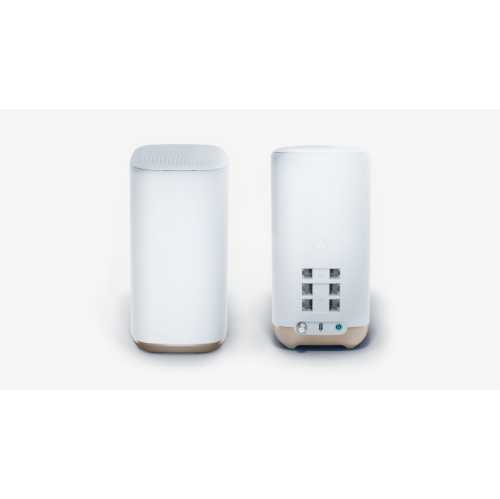
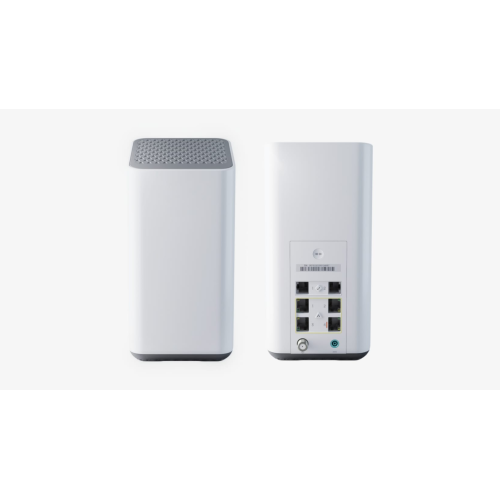
Secure modems form part of a protected home internet connection, linking an internet service provider’s network with the equipment used inside the home. Their role is different from that of a router: a modem handles the connection to the provider, while a router directs traffic between local devices and the internet. Some equipment combines both functions in a single gateway, which can also include Wi-Fi. That distinction matters because many familiar security features, including guest networks, wireless passwords, and household access controls, belong to the router rather than a standalone modem. For a household with laptops on the dining table, a smart television in the living room, and connected devices throughout the home, protection depends on how these pieces work together. A secure modem is not a guarantee against every online threat; its value comes from appropriate security features, supported firmware, and compatibility with the service it connects to. Features such as authenticated firmware updates, protected administration access, and clear information about ongoing support can help distinguish equipment designed with security in mind. The details vary by connection type and provider, so a feature listed for one type of gateway should not be assumed to apply to every modem. Someone working from home may place particular importance on dependable connectivity during video meetings and secure access to employer systems. A family may need a connection that supports several people studying, streaming, and playing online at once. Neither situation makes speed a substitute for security, but both show why stable performance and protection belong in the same conversation. The most suitable equipment fits the household’s internet service, supports its everyday demands, and has a clearly defined path for receiving necessary updates. It should also make its role understandable, whether it serves as a straightforward bridge to a separate router or manages several networking functions within one enclosure. This clarity helps avoid gaps between what the equipment actually does and what the household expects it to protect.
Compatibility is central to choosing a modem because internet connections do not all use interchangeable equipment. Cable service typically requires a compatible cable modem, while DSL service uses different connection technology. Fibre service commonly relies on an optical network terminal supplied or approved by the provider, sometimes alongside a separate gateway. A modem intended for one connection type cannot simply replace equipment designed for another. Provider approval also matters within the same technology: the exact model, hardware revision, and supported service tier may affect whether equipment can be activated and receive the appropriate firmware. Published maximum speeds describe technical capabilities under particular conditions, not a promise that every device in the home will reach that speed. The internet plan, provider network, Ethernet ports, router, and connected devices all influence the result. For households moving large work files or sharing a connection across several rooms, Ethernet port speeds deserve attention alongside the modem’s advertised connection capacity. A fast incoming connection can still meet a bottleneck at a slower port. Physical design matters, too, especially when equipment needs to fit beside a desk, on an open shelf, or near the point where service enters the home. Most modems use rigid housings with ventilation openings, and their intended upright or horizontal orientation helps determine how much usable space they need. Clear space around vents, accessible cable connections, and a stable surface are more useful than tucking the unit tightly behind books or inside a crowded cabinet. Indicator lights can make connection status easier to understand, although their brightness and placement may matter in a bedroom or shared living space. Routine care is generally modest: keeping vents free of dust, avoiding liquids, and preventing tension on power and data cables help protect the enclosure and connections. Cleaning should follow the manufacturer’s directions, with power disconnected where instructed. For long-term use, an intact power adapter, secure cable sockets, and continued firmware support are more meaningful measures of suitability than appearance alone.
The security features that matter most depend on whether the modem operates on its own or as part of a combined gateway. With a standalone modem, a separate router generally provides the household firewall, Wi-Fi protection, and controls for connected devices. Browsing Secure Routers can help clarify that complementary role when planning a complete home network. A combined gateway may offer these functions in one unit, but its specifications should identify which protections are included and which settings the account holder can manage. Strong wireless encryption, a guest network, and separate administrator credentials can be useful gateway features when supported. A visitor’s phone, for example, may only need internet access rather than access to shared storage or a home printer. Remote administration deserves similar attention: access from outside the home is different from signing in through the local network, and unnecessary remote access can add exposure. Firmware support is equally important, though responsibility for updates varies. Internet providers often manage firmware for cable modems and supplied gateways, while other equipment may use a manufacturer-managed update process. Clear documentation about that arrangement helps households understand where security fixes come from and whom to contact when something is wrong. Replacing default administrator credentials, where permitted, and keeping account recovery details protected support the equipment’s built-in safeguards without changing its basic purpose. For remote workers, these measures complement rather than replace employer-required tools such as a virtual private network and device security software. For shared households, they help establish a consistent foundation as phones, consoles, and other devices join and leave the connection. Equipment changes also deserve consideration: a factory reset performed according to the manufacturer’s instructions can remove stored settings before a modem or gateway is passed to another person, while the provider may need to release its registration separately. Secure modems are most useful as one supported component of a well-matched network, with clear responsibilities for connection, routing, wireless access, and ongoing maintenance.
Top selling and popular products
-
 Your price for this item is $189.99
-
 Your price for this item is $189.99
-
 Your price for this item is $219
-
 Your price for this item is $899.99
-
 Your price for this item is $299.99
-
 Your price for this item is $139.99
-
 Your price for this item is $499.99
-
 Your price for this item is $349.99
Discover more categories related to Secure Modems


Top Collections:
Best Black Friday Deals This Year, Best Black Friday Deals On Electronics, Kindle Devices, Pokemon Centers, Best Black Friday Deals On Apple Products, Best Cameras for Sports Photography, Dyson Airwrap, Pokémon 30th Celebration Cards, Apple iPhone 17 Pro, Canon G7X Cameras
Some products may be subject to Environmental Handling Fees
(EHF) depending on your province.
Learn more about EHFs.