Samsung A20
Discover the Samsung A20, a popular choice for those seeking style and performance in a mobile device. Explore a range of options designed to fit your needs, whether you’re upgrading your current phone or shopping for your first smartphone. With the Samsung A20, enjoy seamless connectivity and a sleek look that complements your lifestyle. Find the right model and accessories to make the most of your experience.
Sort


What makes older smartphones suitable for everyday use
Entry-level smartphones bring together the essentials of daily communication: calls, messages, maps, music, photos and access to familiar apps. Older touchscreen phones can still suit straightforward routines, but their usefulness depends on more than whether they power on. Processor performance, memory, battery condition and software support all affect the experience of replying to a message, opening a transit app or joining a video call. A large display gives text and images room to breathe, while AMOLED screen technology can provide strong contrast and deep blacks for photos and video. Screen size and sharpness are separate considerations, however; a larger panel does not necessarily show finer detail. For someone who mainly reads messages, watches occasional clips and makes calls, comfortable text sizing and clear sound may matter more than demanding graphics performance. Limited memory can make switching between several apps feel slower, particularly when navigation, messaging and a browser are running together. Internal storage also has to accommodate the operating system, app updates and downloaded files, leaving less space than the stated capacity might suggest. Expandable storage, where supported, can provide room for photos, music and other compatible files, but it does not increase working memory or guarantee that apps can move to a memory card. Cameras on older entry-level phones are generally better suited to everyday snapshots in good light than fast-moving subjects or dim interiors. An ultra-wide camera, when included, can fit more of a room or group into the frame, although detail and edge distortion may differ from the main camera. These phones can appeal to people with light mobile habits, someone seeking a secondary handset, or a family member who values familiar controls. For older devices, security-update status and the software requirements of essential apps are also important parts of suitability. A handset that remains comfortable for calls and casual media may no longer be an appropriate choice for sensitive accounts if its security support has ended.
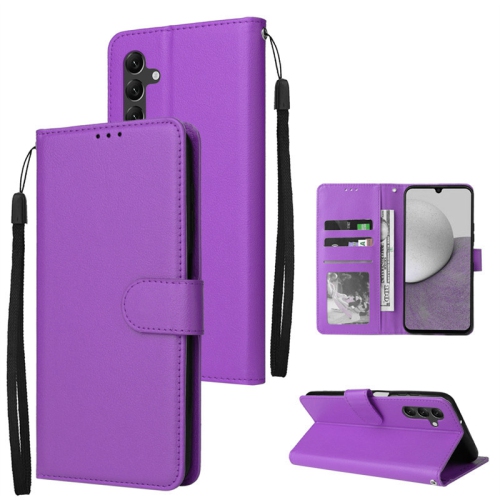
Cases, screen protectors and charging accessories contribute to how comfortably a phone fits into daily life. Compatibility is precise: handsets with similar screen measurements can have different dimensions, camera positions, button placements and charging-port openings. A properly fitted case leaves microphones and speakers unobstructed, gives charging plugs enough clearance and does not press continuously against the side buttons. Flexible cases can add grip and cushioning, while more rigid shells help resist scuffs; designs that combine materials may balance a firm back with softer edges. Raised edges can help keep the screen or camera glass from resting directly against a flat surface, although no case makes a phone immune to impact. Slim profiles slide more easily into a pocket, whereas textured sides can feel steadier during one-handed use. Wallet-style covers add space for cards but also make the handset thicker and may need to stay folded open during calls or photography. Screen protectors have their own fit considerations, including coverage around the front camera and compatibility with the edges of a case. Tempered glass offers a smooth surface, while flexible films may follow curved areas more closely; neither can guarantee that the display will survive a drop. Plastic backs can collect fine scratches from grit inside a case, so occasional cleaning matters even when the phone stays covered. A soft, lint-free cloth is suitable for routine wiping, with any cleaning liquid applied according to the device maker’s care directions rather than sprayed into openings. Charging accessories need the correct connector and an appropriate electrical specification, not simply a matching appearance. A higher-rated power adapter does not automatically make a phone charge faster, because the handset and charging standard determine the power it can accept. Cables with damaged insulation, bent connectors or loose connections should be replaced. Where a headphone jack is fitted, wired headphones offer another listening option without requiring a separate headphone battery.
For pre-owned and refurbished smartphones, condition is a combination of appearance, function and service history. Light marks on the back are different from a cracked screen, an unreliable charging port or a battery that loses charge unusually quickly. Refurbishment descriptions can vary, so the stated testing, battery information and included accessories are more informative than the label alone. Battery capacity when new does not establish how long an older handset will last between charges: battery wear, screen brightness, mobile signal strength and app activity all influence everyday endurance. A phone used mainly for short calls and messages places different demands on its battery from one used for navigation or streaming throughout the day. Functional checks cover the touchscreen, cameras, microphones, speakers, physical buttons and any fingerprint reader, as well as charging and wireless connections. Carrier compatibility deserves separate attention in Canada. An unlocked phone is not automatically compatible with every network or every calling feature; supported network bands and the carrier’s voice-calling requirements still matter. Wi-Fi connectivity can support home browsing and media playback, but it does not replace compatible cellular service for ordinary mobile use away from a network connection. A previously owned handset should also be free of the former owner’s account locks and personal information before setup. For a younger user or a relative receiving a phone as a gift, a comfortable grip, readable text, suitable accessibility settings and straightforward charging can be more useful than an extensive feature list. Parental controls, where supported, help families set boundaries around app access and purchases, while larger text and adjusted sound settings can make everyday communication easier. Comparisons with Samsung Galaxy A06 should account for differences in software support, performance and accessory fit rather than assuming that similar names mean interchangeable parts. The most useful combination is a handset suited to its intended tasks, compatible accessories and a clear understanding of the limits that come with older hardware.
Cases, screen protectors and charging accessories contribute to how comfortably a phone fits into daily life. Compatibility is precise: handsets with similar screen measurements can have different dimensions, camera positions, button placements and charging-port openings. A properly fitted case leaves microphones and speakers unobstructed, gives charging plugs enough clearance and does not press continuously against the side buttons. Flexible cases can add grip and cushioning, while more rigid shells help resist scuffs; designs that combine materials may balance a firm back with softer edges. Raised edges can help keep the screen or camera glass from resting directly against a flat surface, although no case makes a phone immune to impact. Slim profiles slide more easily into a pocket, whereas textured sides can feel steadier during one-handed use. Wallet-style covers add space for cards but also make the handset thicker and may need to stay folded open during calls or photography. Screen protectors have their own fit considerations, including coverage around the front camera and compatibility with the edges of a case. Tempered glass offers a smooth surface, while flexible films may follow curved areas more closely; neither can guarantee that the display will survive a drop. Plastic backs can collect fine scratches from grit inside a case, so occasional cleaning matters even when the phone stays covered. A soft, lint-free cloth is suitable for routine wiping, with any cleaning liquid applied according to the device maker’s care directions rather than sprayed into openings. Charging accessories need the correct connector and an appropriate electrical specification, not simply a matching appearance. A higher-rated power adapter does not automatically make a phone charge faster, because the handset and charging standard determine the power it can accept. Cables with damaged insulation, bent connectors or loose connections should be replaced. Where a headphone jack is fitted, wired headphones offer another listening option without requiring a separate headphone battery.
For pre-owned and refurbished smartphones, condition is a combination of appearance, function and service history. Light marks on the back are different from a cracked screen, an unreliable charging port or a battery that loses charge unusually quickly. Refurbishment descriptions can vary, so the stated testing, battery information and included accessories are more informative than the label alone. Battery capacity when new does not establish how long an older handset will last between charges: battery wear, screen brightness, mobile signal strength and app activity all influence everyday endurance. A phone used mainly for short calls and messages places different demands on its battery from one used for navigation or streaming throughout the day. Functional checks cover the touchscreen, cameras, microphones, speakers, physical buttons and any fingerprint reader, as well as charging and wireless connections. Carrier compatibility deserves separate attention in Canada. An unlocked phone is not automatically compatible with every network or every calling feature; supported network bands and the carrier’s voice-calling requirements still matter. Wi-Fi connectivity can support home browsing and media playback, but it does not replace compatible cellular service for ordinary mobile use away from a network connection. A previously owned handset should also be free of the former owner’s account locks and personal information before setup. For a younger user or a relative receiving a phone as a gift, a comfortable grip, readable text, suitable accessibility settings and straightforward charging can be more useful than an extensive feature list. Parental controls, where supported, help families set boundaries around app access and purchases, while larger text and adjusted sound settings can make everyday communication easier. Comparisons with Samsung Galaxy A06 should account for differences in software support, performance and accessory fit rather than assuming that similar names mean interchangeable parts. The most useful combination is a handset suited to its intended tasks, compatible accessories and a clear understanding of the limits that come with older hardware.
Top selling and popular products
-
 Your price for this item is $56.99
-
 Your price for this item is $60.75
-
 Your price for this item is $369
-
 Your price for this item is $59.99
-
 Your price for this item is $43.25
-
 Your price for this item is $48.75
-
 Your price for this item is $34.99
-
 Your price for this item is $24.99
Discover more categories related to Samsung A20


Top Collections:
Pokemon Centers, Kindle Devices, Best Cameras for Sports Photography, Pokémon 30th Celebration Cards, Apple iPhones 16, Canon G7X Cameras, iPhone 15 Apple, Flip Phones, Samsung Galaxy Phones, Alarm Clock
Some products may be subject to Environmental Handling Fees
(EHF) depending on your province.
Learn more about EHFs.